Require Files on a Transition
A File Field holds evidence — a signed contract, an acceptance protocol, a photo of a delivery. Marking that field required answers one question about it: is there anything in it at all. It asks on every screen the field appears on, and a single file is enough to answer.
File Field has the required files — a workflow rule, or validator in Jira's older wording — answers a different question, at a different moment: does this field hold enough files, of the right kinds, before this work item is allowed to move on? An administrator adds it to one transition — most often the move into Done — and Jira refuses that transition, saying what is missing, until the requirement is met.
The two work well together, and the comparison below shows which answers what.
Add the rule to a transition
Open the workflow
Go to Jira Settings (cog icon, top right) → Work items → Workflows, and edit the workflow used by the project you want to guard.
Add a rule
Choose Add Rule, then search for
fileand pick File Field has the required files — it appears under Marketplace rules. Its description reads "Blocks the transition unless the chosen File Field holds enough files, and a file in each category you require." Click Select.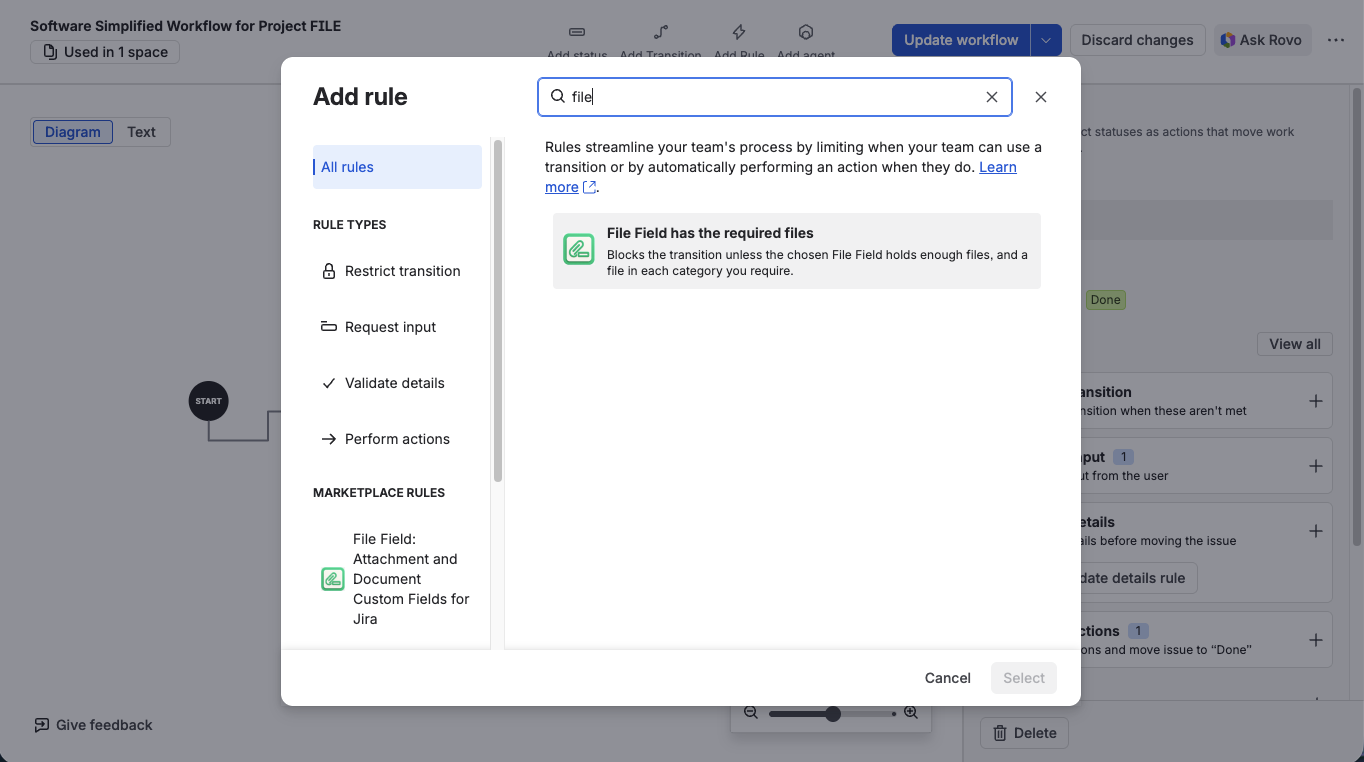
Pick “File Field has the required files” from the rule list
Choose the transition to guard
At the top of the rule's form, set Transition to the move that should not happen without the files — most often Any status → Done.
Fill in the rule
Choose the field, the number of files it must hold, and any categories you want to require, then click Add. The next section walks through all three.
Publish the workflow
Choose Update workflow. A rule that sits in an unpublished draft doesn't guard anything yet.
The validator works in both company-managed and team-managed projects.
One rule guards one field. To require files in two different File Fields on the same transition, add the validator twice. Jira lists validators one under another and each shows its own summary line, so the two rules stay easy to tell apart.
Configure the rule
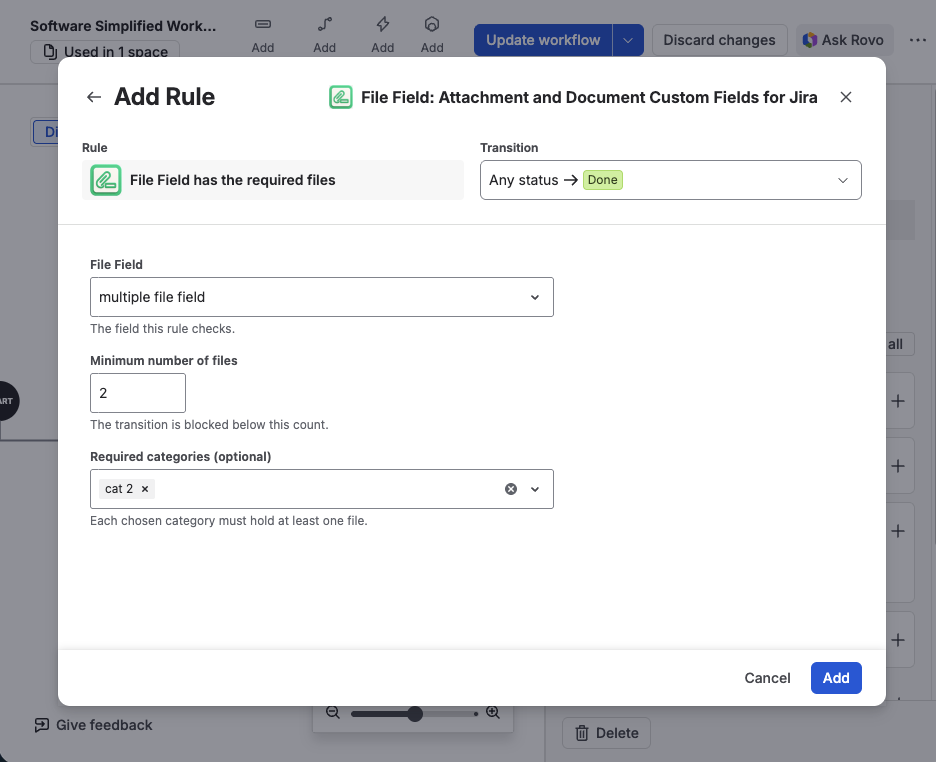
The finished rule — a field, a count, and the categories that must each hold a file
Below the transition, the form has three controls:
| Control | What it is | Required | Default |
|---|---|---|---|
| File Field | The field this rule checks, picked from the File Fields on your site. | Yes | — |
| Minimum number of files | A whole number, 1 or more. The transition is blocked below this count. | Yes | 1 |
| Required categories | Categories defined on the chosen field. Each one you pick must hold at least one file. | No | none |
The category list follows the field. Categories are read from the chosen field's configuration and refresh whenever you change the field selection, so the list always shows that field's own categories. A field with categories turned off, or with none defined, offers nothing to pick — the rule then checks the count alone.
If no File Fields exist on the site yet, the picker has nothing to offer and says so. Add a File Field first, then come back to the workflow.
What the rule checks, and what it doesn't
- Categories are checked by presence, not by count. Each category you select has to hold at least one file. There is no way to ask for two files in the same category.
- The count and the categories are independent. A rule asking for 3 files and for the category Contract is satisfied by 3 files of which one is a Contract — not by 3 Contracts plus 3 other files.
- Reference documents don't count. Reference documents belong to the field's configuration rather than to the work item, so they never satisfy a rule — the same as with a required field, and in JQL.
- File types and sizes aren't the rule's business. Those are the field's own upload rules, enforced when someone attaches a file. See Set Field Configuration.
When the field falls short, Jira refuses the transition and names what is missing: how many files are attached against how many are required, and any category still empty. Requirements that are already met aren't mentioned, so the person reads only what they still have to attach — and can fix it without asking an administrator what the rule wanted.
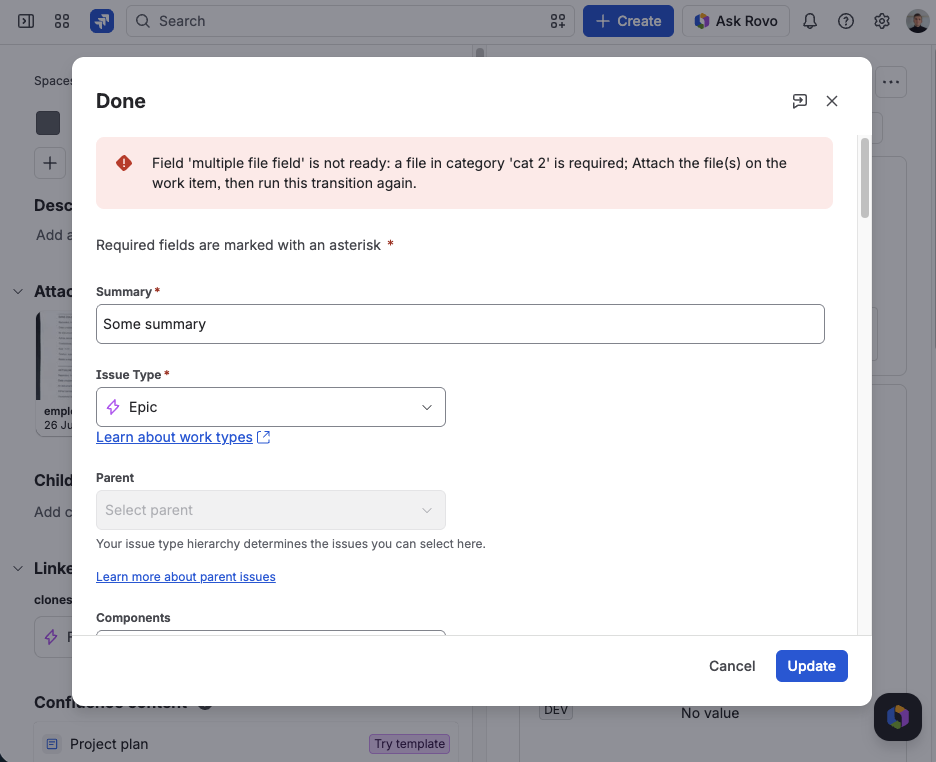
The transition is refused, naming the field and the category that still has no file
Once the missing files are attached, the transition goes through with no message.
Combine with a required field
The two mechanisms answer different questions, and they are easy to confuse:
| Required field | Workflow validator | |
|---|---|---|
| Asks | Is anything in the field? | Does the field hold enough files, of the right kinds? |
| When | Whenever a screen holding the field is submitted | Only on the transition it is added to |
| Configured in | Field configuration | Workflow editor, per transition |
| Can demand a count | No | Yes |
| Can demand categories | No | Yes |
Most setups want both: mark the field required so nobody creates a work item with no evidence at all, and add a workflow rule so nobody closes one without the complete set.
What's next?
- Classify Files with Categories — define the categories a rule can require
- Make the Field Required — the screen-level check this rule complements
- Find Issues by Their Files (JQL) — report on what is attached across a project
- Set Field Configuration — the Allowed files tab: types, count, and size
- Block a Jira Transition Until the Required Files Are Attached — the same rule walked through on one process, and what Jira validates natively