Block a Jira Transition Until the Required Files Are Attached
A release moves to Done. Six weeks later someone asks for the test evidence, the rollback plan, and the approval that was supposed to sit behind it, and two of the three were never attached. Nobody lied and nobody skipped a step — the Definition of Done asked for three documents, and the workflow asked for nothing. A definition that lives on a wiki page is a promise; only a transition can turn it into a rule.
TL;DR
Native Jira can validate an attachment on a transition — but it validates the wrong thing. It asks whether a file was added in that dialog, needs a transition screen to ask at all, and has no way to demand a number or a kind. A File Field validator checks the state of a named field instead: at least n files, and a file in each category you require. Jump to building the gate.
What Jira validates natively — and what it misses
The usual advice is that attachments can't be validated on a transition at all. That's not quite right, and the real answer is more useful. (If you'd rather read this where those questions get asked, we've published a companion version on the Atlassian Community.)
Jira's built-in Field Required validator does accept the Attachment field — but only if you first create a transition screen and put Attachment on it. Without that screen the validator blocks the transition no matter what is attached, a gap Atlassian logged as JRACLOUD-74046 and eventually closed with the resolution Timed out, undocumented and unfixed.
Set up correctly, it works. The question it asks is just narrower than the one most gates need:
- It validates a moment, not a state. The file has to arrive in the transition dialog. A document someone attached to the work item last Tuesday — the signed approval, the test report — doesn't satisfy it. The rule is "did you upload something just now", which is why teams end up re-attaching files they already have.
- It can't count. One file and nine files look identical to it.
- It can't tell documents apart. Any file passes. A screenshot of the login page satisfies a rule that meant rollback plan.
To be fair to it, there's one place where "did you upload something just now" is exactly the right question: creating a work item. There is no earlier state to overlook, so the same validator on the Create transition genuinely solves "no bug report without a screenshot" — that case, and the rest of the native map, is here.
Everywhere after create, the question drifts away from what anyone meant. And the last two points are the real gap: most gates that matter aren't about a file. They're about a set.
Why a required field isn't the whole answer
Keeping the document in a real custom field solves the first problem cleanly: a File Field is a genuine Jira field, so the Required flag applies to it on create, edit, and transition screens, and it checks what the field holds rather than what someone just uploaded. If you haven't set that up yet, How to Make an Attachment Mandatory in Jira Cloud is the walkthrough.
But Required answers exactly one question: is there anything in the field? One file answers it, and answers it forever. Attach the test report on day one and the field is "filled" for the rest of the work item's life — including the moment it closes without the approval anybody actually cared about.
Three documents required, one attached, transition allowed. The gate is real; it's just set to one.
What "complete" can mean
The workflow rule File Field has the required files asks the other question — does this field hold enough files, of the right kinds, before this work item is allowed to move on? — and it asks it only on the transition you attach it to.
It gives you two dials, and they are independent:
- A minimum number of files. A whole number, 1 or more. Below it, the transition is blocked.
- Required categories. Each category you select must hold at least one file.
Independent is the word to hold onto, because it's where people guess wrong. A rule asking for 3 files and for the category Approval is satisfied by three files of which one is an Approval. It does not mean three Approvals, and it does not mean three files plus an Approval.
Two more boundaries worth knowing before you design a gate around it:
- Categories are checked by presence, not by count. Each selected category needs one file. There's no way to ask for two files in the same category.
- Reference documents don't count. They belong to the field's configuration rather than to the work item, so they never satisfy a rule — the same as with a required field, and in JQL.
File types and sizes aren't the rule's business either. Those are the field's own upload rules, enforced when someone attaches a file rather than when they try to leave.
Build the gate
The example throughout: a change that cannot reach Done without test evidence, a rollback plan, and an approval — three documents, three kinds, in one field. It's the Definition of Done from the wiki page, written somewhere Jira can read it.
Give the documents one field and three categories
Create a File Field named for the job — Release Evidence — and add it to the screens the change uses. In its configuration, turn on categories and define Test Evidence, Rollback Plan, and Approval. Categories are what let one field carry three distinct documents while still being one field to configure, one column in a board, and one thing to search.
Add the rule to the workflow
Go to Jira Settings → Work items → Workflows and edit the workflow. Choose Add Rule, search for file, and pick File Field has the required files — it sits under Marketplace rules.
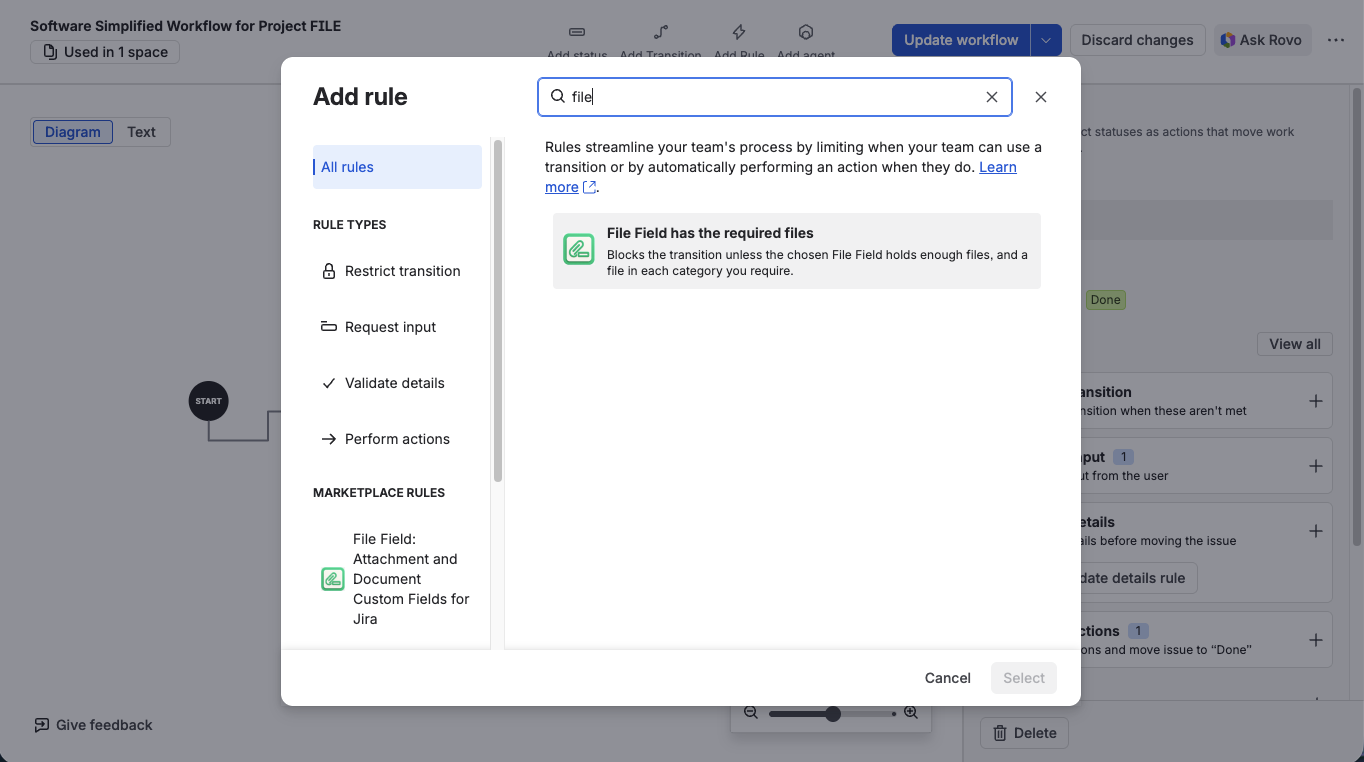
The rule lives under Marketplace rules, next to Jira's own rule types
Point it at the transition and set both dials
Set Transition to Any status → Done. Then choose the File Field (Release Evidence), set Minimum number of files to 3, and select all three categories under Required categories. The category list is read from the field you picked and refreshes when you change that selection, so it always shows that field's own categories.
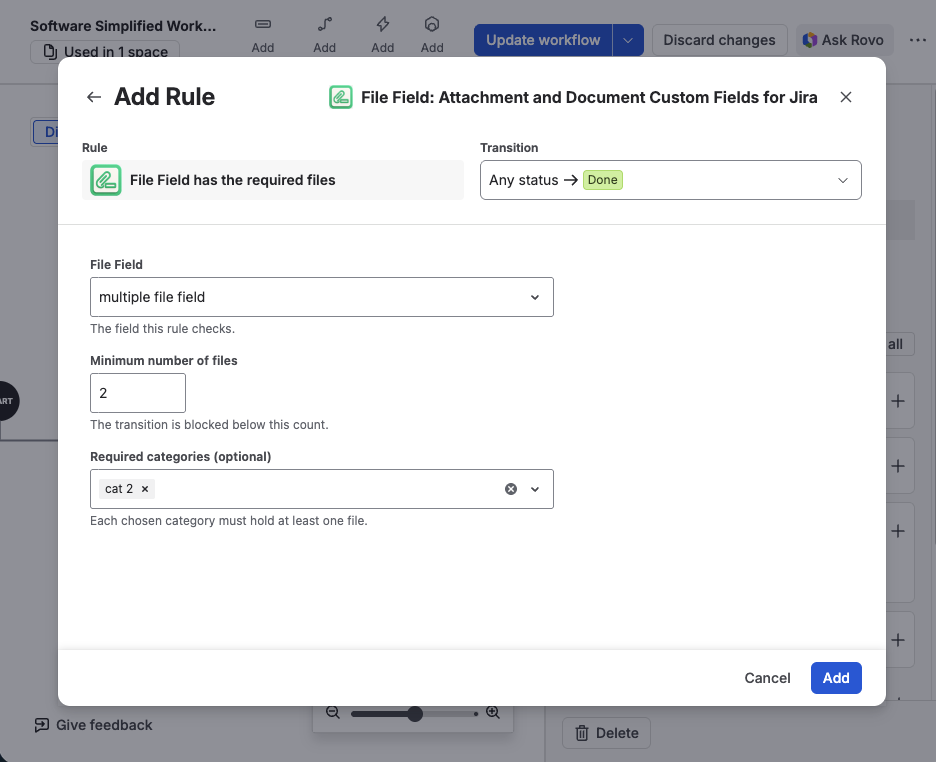
A field, a count, and the categories that must each hold a file
No transition screen is involved. The rule reads the field as it stands on the work item, so files attached last week count exactly as much as files attached a minute ago.
Publish the workflow
Choose Update workflow. A rule sitting in an unpublished draft guards nothing — this is the step that quietly gets skipped.
The rule works in both company-managed and team-managed projects. One rule guards one field; to require files in two different File Fields on the same transition, add the rule twice, and each shows its own summary line in the workflow.
When the transition is refused
Jira stops the transition and names what is missing — how many files are attached against how many are required, and every category still empty:
Field <field name> is not ready: a file in category <category> is required; Attach the file(s) on the work item, then run this transition again.
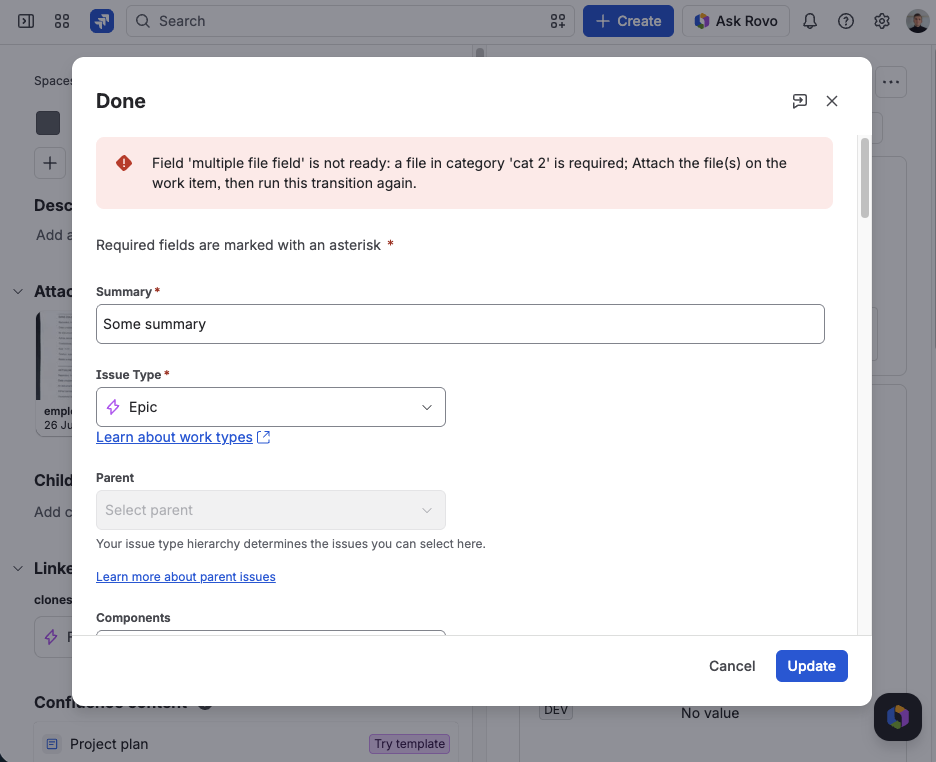
The message on a test project — it names the field, then each requirement still unmet
Requirements that are already met aren't mentioned. That sounds like a detail, and it's the difference between a gate people route around and one they use: the person reads only what they still have to attach, fixes it themselves, and never has to ask an administrator what the rule wanted. Once the files are there, the transition goes through with no message at all.
Use both gates
Required and the workflow rule are easy to confuse, and most setups want both:
| Required field | Workflow rule | |
|---|---|---|
| Asks | Is anything in the field? | Does the field hold enough files, of the right kinds? |
| When | Whenever a screen holding the field is submitted | Only on the transition it's added to |
| Configured in | Field configuration | Workflow editor, per transition |
| Can demand a count | No | Yes |
| Can demand categories | No | Yes |
Mark the field required so nobody opens a change with no evidence at all; add the workflow rule so nobody closes one with an incomplete set. Between them, the Definition of Done stops depending on whether anyone remembered it.
Find what closed before the rule
Every gate arrives after a backlog. The rule guards transitions from the moment the workflow is published, so the changes that reached Done last quarter are untouched by it — including the one from the top of this article. Because a File Field is a real field in JQL, you can go and look instead of wondering.
Counting is exact:
project = OPS AND statusCategory = Done AND "Release Evidence.FileCount" < 3
That returns every change closed with too few files. It won't catch the other way of falling short — three files, none of them the approval — because it never looks at categories. For that, search the category itself:
project = OPS AND statusCategory = Done AND "Release Evidence.Categories" = "Approval"
This one lists the closed changes that do carry an approval. Put its count beside the count of closed changes overall and the difference is your exceptions list: one saved filter per document you care about, and the gap is visible without opening a single work item. The wider set of file queries is in Find Jira Issues Missing an Attachment, Now with JQL.
Six weeks after the fact, that is the whole difference between an answer and an afternoon — and the reason to spend twenty minutes in the workflow editor before the next release closes.
Make Done mean the paperwork is done
File Field adds a native attachment custom field to Jira and JSM — categories, upload rules, JQL, and a workflow rule that blocks a transition until the set is complete. Free trial on the Atlassian Marketplace.
Try File Field on MarketplaceFrequently asked questions
Can a Jira workflow transition require an attachment? Natively, only in a narrow way: the Field Required validator accepts the Attachment field, but it needs a transition screen carrying that field, and it's satisfied only by a file uploaded during the transition itself. It can't check what the work item already holds, can't require a number of files, and can't distinguish one document from another. On the Create transition that's enough, because there's no earlier state; on any later transition it isn't.
Can I require a specific number of files before Done? Yes. The Minimum number of files setting takes any whole number from 1 up, and the transition is blocked below that count.
Can I require different kinds of documents, not just any three files? Yes, through categories. Select the categories the rule should demand and each one must hold at least one file — one Test Evidence and one Rollback Plan, not merely two files.
Do the count and the categories multiply? No, they're independent. A rule asking for 3 files and the category Approval is met by 3 files of which one is an Approval.
Does it work in team-managed projects? Yes, in both company-managed and team-managed projects.
Can one transition guard two different File Fields? Yes. One rule checks one field, so add the rule twice — Jira lists them one under another, each with its own summary line.
What happens to work items that closed before the rule existed? Nothing — the rule applies to transitions from the moment the workflow is published. Find them afterwards with JQL: a file-count query returns the ones closed with too few files, and a category query lists the ones carrying a given document, which you can set against the total to see what's missing.