File Field — a native attachment field for Jira & JSM
File Field adds a native attachment field (a file-upload custom field) to Jira and Jira Service Management for attaching files directly to issues and to the JSM customer portal. Upload multiple files per field, enforce admin-defined rules for type, count, and size, and keep every file stored inside Atlassian.
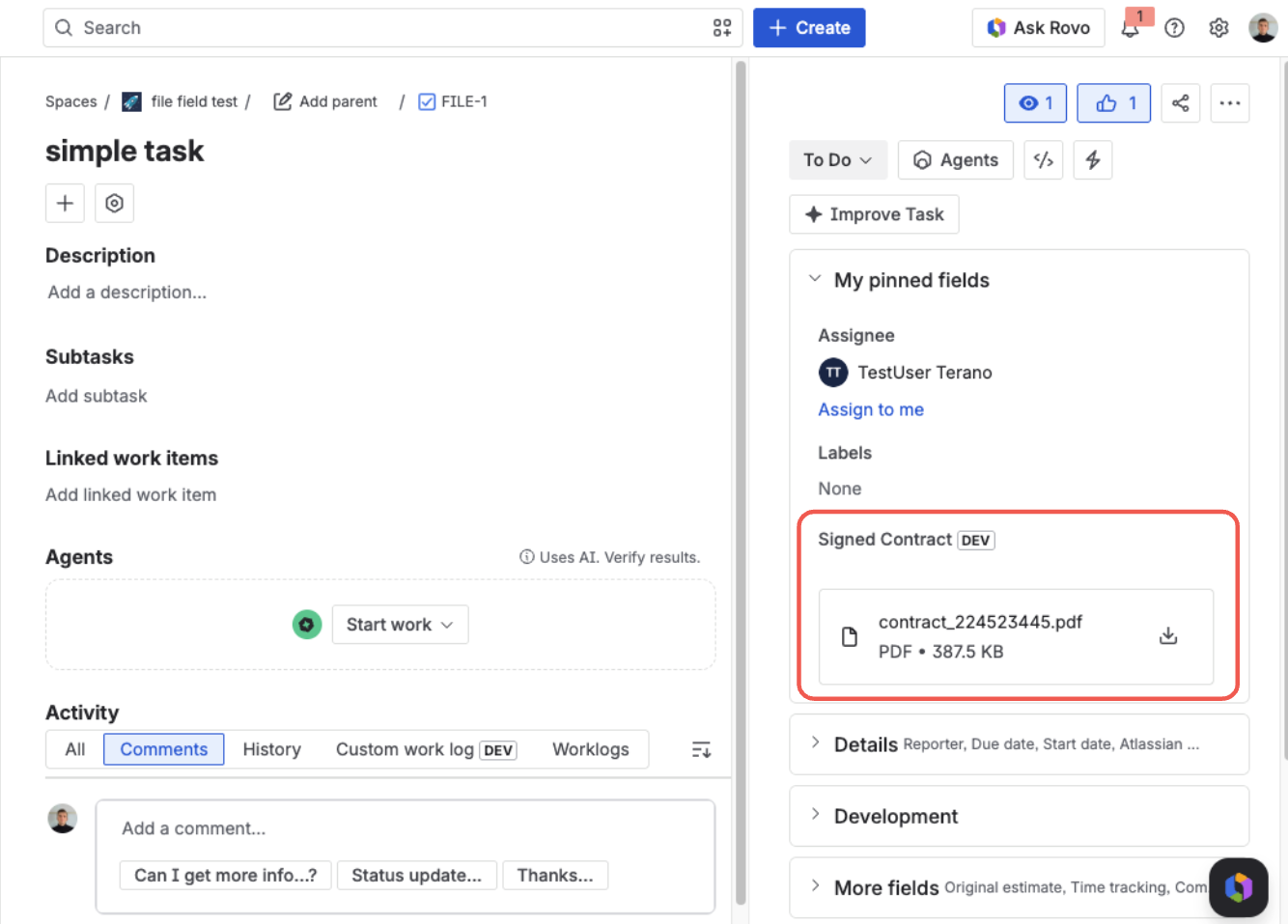
File Field on a Jira issue — each attached file shows its name, type, and size, with download and delete actions
What is File Field?
File Field is a native Jira custom field type. An administrator adds it to a project just like any other field, and it renders directly in the Jira interface — there is no separate panel, pop-up, or embedded window to load.
Once it's on a screen, the field appears wherever that screen is used — the issue view, the create-issue form, and workflow transitions. People attach files in place, and the field saves on its own.
What problems does it solve?
Jira's built-in attachments are a single, unstructured pile on the issue, with no control over what gets added or how much. When a specific document matters — a signed contract, a screenshot, a compliance record — there's no dedicated place for it and no rules to enforce.
File Field gives you a dedicated, governed attachment field instead of a free-for-all:
One unstructured pile — anyone adds anything.
- No type limit
- No size limit
- Can't be required
Named fields — each holds exactly the file it's meant to.
Key capabilities
- Multiple files per field — attach as many files as the policy allows, all in one place.
- Per-context upload rules — admins set the allowed file types, the maximum number of files, and the maximum file size.
- File categories — optionally label each file with a colored category, so one field can hold different document types that stay easy to tell apart, export, and find in JQL.
- Choose how files are shown — draw a field's files as compact rows, as full cards, or as a grid of tiles, set once per field context with a live preview.
- Reference documents — publish a template, a procedure, or a worked example on the field itself, so everyone who fills it in can read what they need without leaving the issue.
- Preview without downloading — open an image, PDF, CSV table, or text file attached to the field and read it in place: whole documents scroll, text is searchable, and the arrow keys step between files, with the same permissions as everything else.
- Files stay inside Atlassian — nothing is sent to external or third-party services.
- Permission-aware — every upload, download, and delete is checked against the user's Jira permissions.
- Works on the JSM portal — customers can attach files when they raise or update a request.
- Native and lightweight — built on Atlassian Forge and rendered natively in Jira.
Where the field appears
Wherever the screen it's on is used, including:
- The issue view
- The create-issue form
- Workflow transition screens
- The Jira Service Management customer portal
Get started
Ready to try it? Add File Field from the Atlassian Marketplace to start a free trial, then follow the Quick Guide to add the field, set your upload rules, and attach your first file.