Audit Trail
The Audit Trail is a permanent, immutable record of every action performed by the app. Every entry is written once and cannot be modified. This makes it suitable as compliance evidence and as a forensic tool for incident investigation.
Required: Manage deleted issue backups permission (granted to Jira Administrators by default).
What is logged
Every significant action produces an audit record:
DELETE_TRACKED — An issue was deleted and its snapshot was captured
RESTORE_ISSUE — A restore was attempted (success, partial, or failed)
EXPORT_ISSUE — A snapshot was exported to JSON or CSV
DELETE_RECORD — A snapshot was manually and permanently deleted
UPDATE_SETTINGS — App settings or a project tracking profile was changed
RETENTION_CLEANUP — The automatic daily cleanup removed expired records
What each entry contains
| Field | Description |
|---|---|
| Timestamp | Exact date and time of the action |
| Actor | The user who performed the action — with display name and avatar |
| Action | The action type (from the table above) |
| Result | success, warning, or failed |
| Target | The issue or record this action was performed on |
| Details | A human-readable summary — e.g. "Comments: 3 of 5 restored; Worklogs: skipped" |
Accessing the Audit Trail
The Audit Trail is accessible from the Audit Trail tab in the Deleted Issues panel.
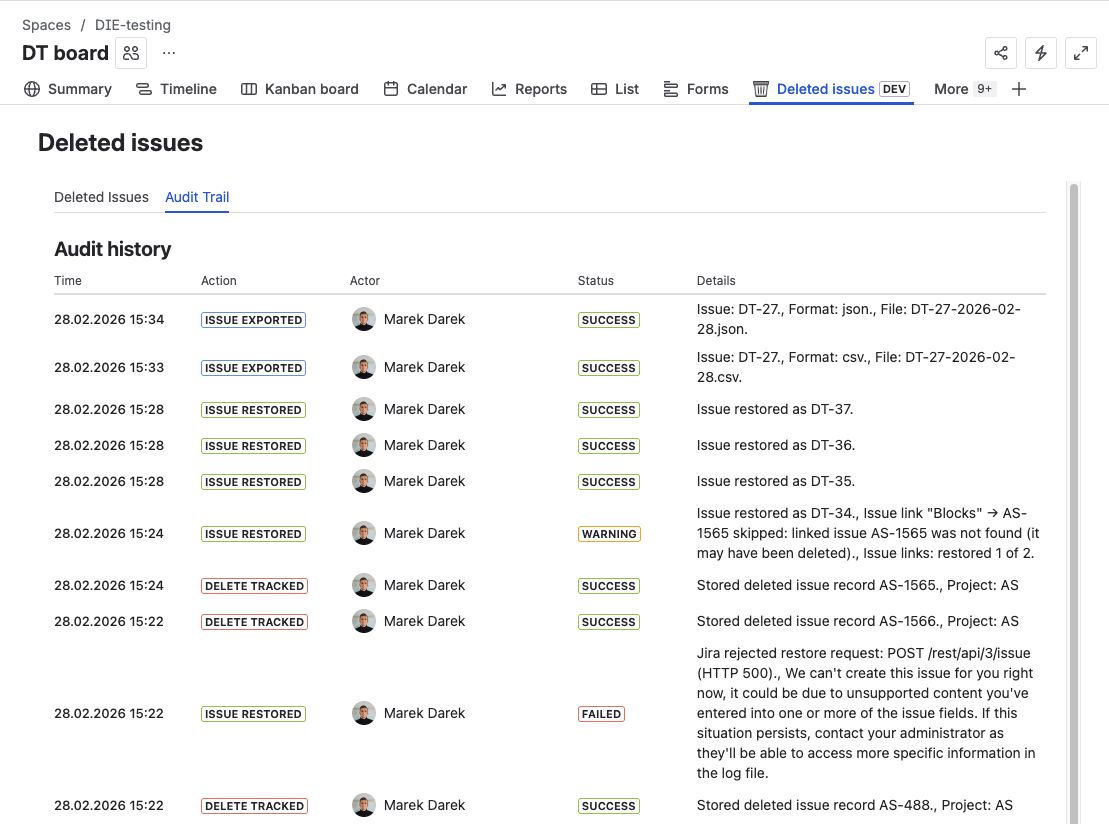
The list shows the most recent entries, sorted from newest to oldest.
Immutability guarantee
Audit records are written once. They cannot be edited, backdated, or deleted through any user action. The only way records are removed is through the automatic retention cleanup — after the configured audit retention period (default: 180 days).
This makes the Audit Trail suitable for:
- Compliance audits — demonstrate that specific actions were taken at specific times by identified users
- Security investigations — establish who accessed or exported sensitive snapshot data
- Incident reconstruction — understand the sequence of events after a mass deletion
- Dispute resolution — provide an objective record of what was done and by whom
Using the Audit Trail for compliance
The Audit Trail supports common compliance scenarios out of the box:
Demonstrating data recovery capability:
DELETE_TRACKED and RESTORE_ISSUE entries show that deletions are captured and recoverable.
Evidencing who accessed sensitive data:
EXPORT_ISSUE entries show who exported snapshot data, when, and in what format.
Proving configuration changes are tracked:
UPDATE_SETTINGS entries show when tracking or retention settings were changed and by whom.
Supporting retention compliance:
RETENTION_CLEANUP entries confirm that data is being purged according to the configured policy.
Audit Trail retention
Audit records are retained for 180 days by default, configurable in App Settings → Retention Policy (the Audit records retention field).
Increasing audit retention is recommended for organizations with annual audit cycles or long-term compliance requirements.
What's next?
- Retention Policy — configure how long audit records are kept
- Browse Deleted Issues — operational panel for searching and restoring
- Dashboard Gadget — visual overview of deletion and recovery activity