REST API
Storage Saver's REST API lets your own tooling list the files the app has moved and download them, for example to keep a copy in your own backup storage. It is read-only: it never moves, restores or deletes a file.
Turn on the REST API
App REST APIs are off by default. A site or organization admin turns them on for each site.
Open Storage Saver in Connected apps
In Atlassian Administration, select your organization, then Apps → Sites → your site → Connected apps. Find Storage Saver and select View app details.
Enable App REST APIs
On the Details tab, enable App REST APIs. The section then shows the API's base URL. Disabling it later blocks every call at once.
While it is on, any member of your organization with a verified Atlassian account can create an integration for the API. Storage Saver answers only the accounts a Jira administrator allows.
Allow an account
Open the Recovery manifest tab
Go to Jira settings → Apps → Storage Saver and select Recovery manifest. Only Jira administrators can open it.
Choose the account
Under Back up through the REST API, search for the person in Allow an account. Choose the account that will grant your integration its consent: Storage Saver checks that account on every call, whoever runs the tooling. Only active people's accounts are offered, not app or customer accounts.
Select Allow
The account is added to the list. Last used shows the date of its latest call, or Never.
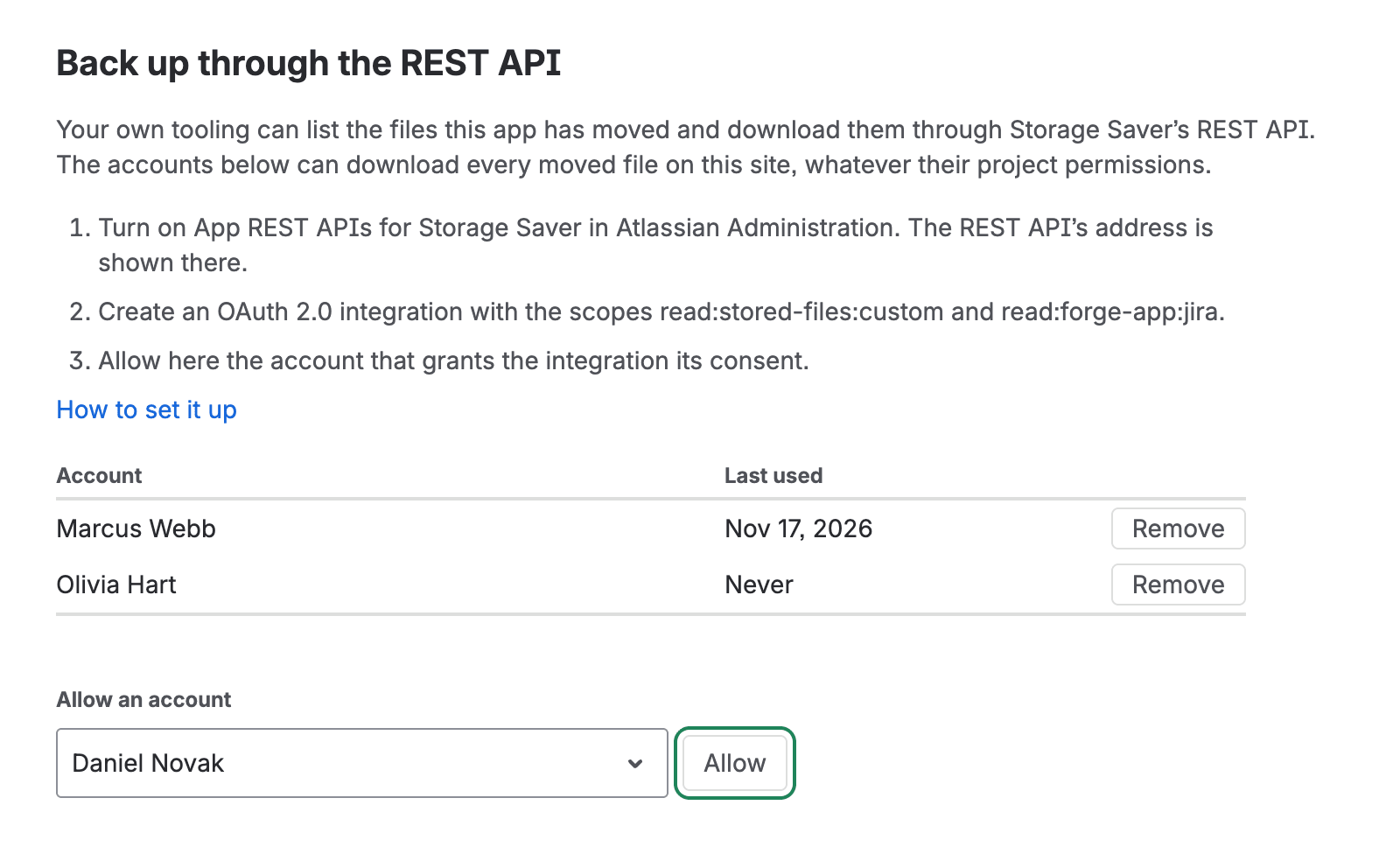
Allow turns on once you choose an account
The list holds up to 10 accounts. An allowed account can list and download every moved file on the site, regardless of its project permissions. Remove takes an account off the list, and its next call is refused.
Create an OAuth 2.0 integration
The API accepts OAuth 2.0 (3LO) access tokens only.
Create the integration
Sign in to the Atlassian Developer Console as the account you allowed in Storage Saver, and create an OAuth 2.0 (3LO) integration. A new integration is private: only its owner can grant it consent.
Add both scopes
Under Permissions, add Storage Saver with Add Marketplace or custom app and select
read:stored-files:custom. Then add Jira API, open its Granular scopes tab, choose Edit Scopes and selectread:forge-app:jira.Copy the authorization URL
Under Authorization, choose Configure next to OAuth 2.0 (3LO) and enter the URL your tooling listens on in Callback URLs. The Authorization URL generator on that page then shows two URLs. Copy the one in the Marketplace App: Storage Saver - Free Up Attachment Storage for Jira row, not Granular Jira API authorization URL. A token from the Jira row, or from an authorization URL built by hand, lacks
read:stored-files:custom.Grant consent
Open the URL, pick your site in Install app on and choose Accept. The consent screen lists Read files moved by Storage Saver.
Send the access token in the Authorization header of every request:
Authorization: Bearer <access token>
Access tokens expire after one hour. For a backup that runs unattended, add offline_access to the scope parameter
of the authorization URL to get a refresh token. Refresh tokens rotate: each refresh returns a new refresh token that
replaces the one you used. Atlassian's OAuth 2.0 (3LO) apps
guide covers the authorization URL, the token exchange and refreshing.
Build the base URL
Endpoint paths are relative to the base URL. Both forms reach the same API:
https://<your-site>.atlassian.net/gateway/api/svc/jira/apps/08975f95-fe1c-44a2-8d0c-6c2d22ddbc5f_9d3bda15-365b-4bac-b8bd-819ac78956ce
https://api.atlassian.com/svc/jira/<cloud-id>/apps/08975f95-fe1c-44a2-8d0c-6c2d22ddbc5f_9d3bda15-365b-4bac-b8bd-819ac78956ce
The last segment is Storage Saver's app ID and production environment ID, joined by _. Your cloud ID is the cloudId
returned by https://<your-site>.atlassian.net/_edge/tenant_info.
List moved files
GET /v1/files
Returns one page of Storage Saver's file records: moved and restored files, failed moves, and files whose stored copy was deleted. They are the records of the recovery manifest.
Scopes: read:stored-files:custom, read:forge-app:jira
Query parameters
| Name | Type | Description |
|---|---|---|
limit | integer | Maximum number of files on the page. Minimum 1, maximum 100, default 100. |
cursor | string | The nextCursor value of the previous page, percent-encoded. Omit it for the first page. |
Example
curl -H "Authorization: Bearer <access token>" -H "Accept: application/json" \
  "<base URL>/v1/files?limit=100"
{
  "files": [
    {
      "id": "10234",
      "downloadable": true,
      "issueKey": "<work item key>",
      "issueId": "10045",
      "projectKey": "<project key>",
      "originalAttachmentId": "10234",
      "filename": "contract.pdf",
      "mimeType": "application/pdf",
      "size": 482113,
      "objectKey": "<object key>",
      "checksum": "<SHA-256, base64>",
      "status": "archived",
      "archivedAt": "2026-11-17T09:12:44.512Z",
      "nativeDeletedAt": "2026-11-17T09:12:51.208Z",
      "originalCreated": "2025-03-04T14:20:07.000+0000",
      "originalAuthorId": "<account ID>",
      "originalAuthorName": "Olivia Hart",
      "archivedById": "<account ID>",
      "archivedByName": "Marcus Webb",
      "objectVerifiedAt": "2026-11-17T09:12:49.930Z",
      "inlineCheckedAt": "2026-11-17T09:12:45.101Z",
      "inlineCheckMethod": "no-media-nodes",
      "restoreRequestedAt": null,
      "restoredAt": null,
      "restoredAttachmentId": null,
      "restoredById": null,
      "restoredByName": null,
      "purgedAt": null,
      "attempts": 1,
      "lastAttemptAt": "2026-11-17T09:12:44.512Z",
      "failureCode": null,
      "failureReason": null,
      "failedAt": null,
      "failedFromStatus": null
    }
  ],
  "undecodable": [],
  "nextCursor": "<cursor>"
}
Response
| Name | Type | Description |
|---|---|---|
files | array of objects | The files on this page. See The file object. |
undecodable | array of objects | Records on this page that Storage Saver cannot read, each with id and reason (strings). |
nextCursor | string or null | The cursor for the next page. null on the last page. |
Paging
- Request pages until
nextCursorisnull. A page before the last can hold fewer files thanlimit. - Files come in no particular order. A file moved during your run can appear on any page.
- A cursor is valid for the current run only. Do not store it for the next run.
The file object
Every file has all of these fields, in this order. A field that does not apply is null. Timestamps are ISO 8601 in UTC,
except originalCreated, which keeps the format Jira returned.
| Field | Type | Description |
|---|---|---|
id | string | The file's ID in this API: the ID of the Jira attachment it was. Pass it to Get download links. |
downloadable | boolean | true when a stored copy exists to download. Use this, not status, to decide what to fetch. |
issueKey | string | The work item's key at the time of the move. |
issueId | string | The work item's ID. |
projectKey | string | The project's key at the time of the move. |
originalAttachmentId | string | The ID of the Jira attachment. Same as id. |
filename | string | The file name in Jira. |
mimeType | string | The file's media type. |
size | integer | Size in bytes. |
objectKey | string or null | The stored copy's key. It never changes, and no two stored copies share it. null until the copy is stored. |
checksum | string or null | SHA-256 of the file, base64-encoded. null until the copy is stored. |
status | string | The record's state. See Status values. |
archivedAt | string | When the move started. |
nativeDeletedAt | string or null | When the Jira attachment was deleted. |
originalCreated | string | When the attachment was added in Jira. |
originalAuthorId | string | Account ID of the person who added it. |
originalAuthorName | string | Their display name as Jira showed it then. |
archivedById | string | Account ID of the person who moved it. |
archivedByName | string | Their display name as Jira showed it then. |
objectVerifiedAt | string or null | When the stored copy's size and checksum were verified. |
inlineCheckedAt | string or null | When the work item's text was checked for uses of the file. |
inlineCheckMethod | string or null | How that check was made. |
restoreRequestedAt | string or null | When a restore was requested. |
restoredAt | string or null | When the restore finished. |
restoredAttachmentId | string or null | ID of the attachment the restore created. |
restoredById | string or null | Account ID of the person who restored the file. |
restoredByName | string or null | Their display name as Jira showed it then. |
purgedAt | string or null | When the stored copy was deleted. |
attempts | integer | Number of attempts the move took. |
lastAttemptAt | string or null | When the last attempt was made. |
failureCode | string or null | Stable code of a failed move. |
failureReason | string or null | The message the app shows for the failure. |
failedAt | string or null | When the move failed. |
failedFromStatus | string or null | The status the record had when the move failed. |
Status values
status | Meaning |
|---|---|
pending, stored | A move is in progress. |
archived | The file is moved. |
restoring, restored | A restore is in progress, or finished. |
purged | The stored copy was deleted. |
failed | The move failed. See failureCode and failureReason. |
Get download links
POST /v1/files/links
Returns a one-hour download link for each file ID in the request.
Scopes: read:stored-files:custom, read:forge-app:jira
Request body
Send JSON with Content-Type: application/json.
| Name | Type | Description |
|---|---|---|
ids | array of strings | Required. 1 to 100 file IDs from List moved files, each a non-empty string of up to 255 characters. Numbers are refused: {"ids": [10234]} returns 400 bad-request. Repeated IDs count toward the 100 and are answered once. |
Example
curl -X POST -H "Authorization: Bearer <access token>" \
  -H "Accept: application/json" -H "Content-Type: application/json" \
  -d '{"ids": ["10234", "10235", "10236", "10237"]}' \
  "<base URL>/v1/files/links"
{
  "links": [
    {
      "id": "10234",
      "url": "<download link>",
      "expiresAt": "2026-11-18T13:04:05.000Z",
      "objectKey": "<object key>",
      "checksum": "<SHA-256, base64>",
      "size": 482113,
      "filename": "contract.pdf"
    }
  ],
  "errors": [
    {
      "id": "10235",
      "code": "not-downloadable",
      "message": "This file has no stored copy to download (status: purged)."
    },
    {
      "id": "10236",
      "code": "mint-failed",
      "message": "A download link could not be created just now. Send this id again.",
      "retryable": true
    }
  ],
  "notProcessed": ["10237"]
}
Response
Each ID you sent appears once, in one of the three arrays, in the order you sent it.
| Name | Type | Description |
|---|---|---|
links | array of objects | A link for each file that got one. |
errors | array of objects | Each file that did not get a link, with the reason. |
notProcessed | array of strings | IDs the call did not reach within its time limit. Normal for a full batch: send them again in a later call. |
Link object
| Field | Type | Description |
|---|---|---|
id | string | The ID you sent. |
url | string | The download link. Anyone who has it can download the file, without a token, until expiresAt. Never log it. |
expiresAt | string | When the link expires, ISO 8601 in UTC. |
objectKey, checksum, size, filename | As in the file object, so you can name and verify the download. |
Error object
Each error has id, code and message. A mint-failed error also has retryable (boolean).
code | Description | Retry |
|---|---|---|
not-found | Storage Saver has no file with this ID. Any string that is not a file's id, such as an objectKey, returns this. | No |
not-downloadable | The file has no stored copy (the message names its status), or Storage Saver cannot read its record. | No |
mint-failed | The link could not be created. This can happen to a file listed as downloadable. | When retryable is true |
Handle errors
Every response from Storage Saver with a status other than 200 has this body. Act on code; message is for people.
{
  "error": {
    "code": "not-allowed",
    "message": "This account may not use the Storage Saver REST API. A Jira administrator can allow it on the Storage Saver admin page, on the Recovery manifest tab."
  }
}
| Status | code | Returned if |
|---|---|---|
400 | bad-request | limit is not a whole number from 1 to 100, or the body is not {"ids": [...]} with 1 to 100 valid IDs. |
400 | bad-cursor | The cursor was not issued by this API, or has expired. Start again without a cursor. |
401 | from Atlassian | The access token is missing or expired. |
403 | not-allowed | The account that granted consent is not on the list on the Recovery manifest tab. While the list is empty, every call returns this. |
403 | from Atlassian | The token lacks a scope, and the message names it. Missing: [read:stored-files:custom] usually means the authorization URL came from the Jira row of the generator. |
500 | unexpected | Storage Saver hit an unexpected error. Retry; if it keeps happening, contact support. |
503 | unavailable | Storage Saver could not read its data. Retry. |
Atlassian answers its 401 and 403 before the request reaches Storage Saver, with its own body.
Back up every file
List every page
Call
GET /v1/fileswithout a cursor, then with eachnextCursoruntil it isnull. Record theundecodableentries as files this run cannot back up.Pick the files to fetch
Keep the files whose
downloadableistrueand whoseobjectKeyyou do not hold yet. A file still being moved is picked up by a later run.Request links
Send the IDs to
POST /v1/files/links, up to 100 per call. Send thenotProcessedIDs, and themint-failedIDs whoseretryableistrue, again in a later call.Download and verify
Download each
urlbefore itsexpiresAt, and request a new link for one that expired. Compute the SHA-256 of the bytes, base64-encode it and compare it withchecksum.
objectKey and checksum can contain /, + and =. Store and compare them as returned, and encode them before you
use one in a URL or a file path.
Check the scopes each endpoint needs
| Method | Path | Scopes |
|---|---|---|
GET | /v1/files | read:stored-files:custom, read:forge-app:jira |
POST | /v1/files/links | read:stored-files:custom, read:forge-app:jira |
read:stored-files:custom ("Read files moved by Storage Saver") is Storage Saver's own scope. read:forge-app:jira is
Jira's scope for calling a Forge app's REST API.