Template Availability
Control where an Issue Template can be used by defining its availability scope.
This setting determines in which projects the template is visible and usable.
What Is Template Availability?
Template Availability defines the project scope of an Issue Template.
For each template, you can decide whether it should:
- be available globally in all projects, or
- be limited to selected projects only
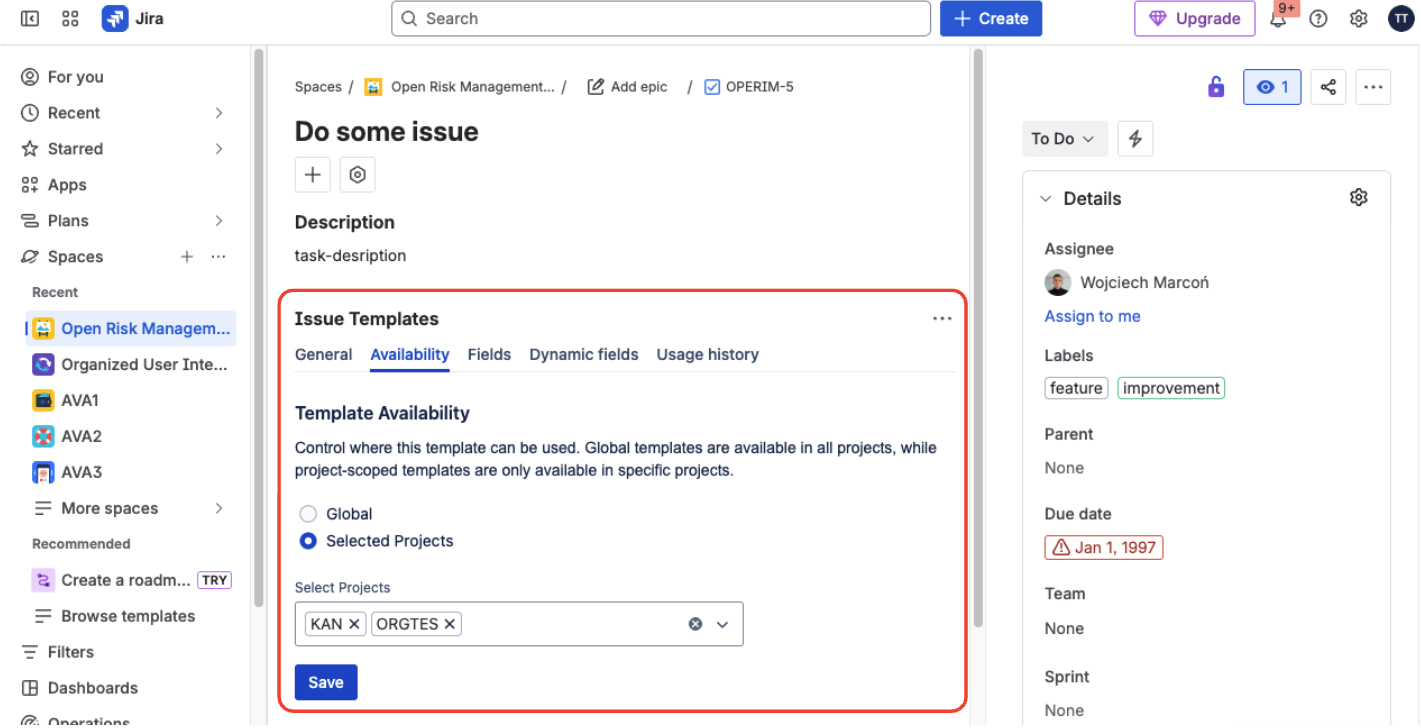
Configuring template availability per project
This allows you to reuse templates safely across your Jira instance without duplicating or exposing them where they don’t belong.
How It Works
Template availability is configured directly on the Issue Template.
Open the Template
Open an issue marked as an Issue Template.
Go to Issue Templates Panel
Navigate to the Issue Templates panel on the issue view.
Find Template Availability
Locate the Template Availability section within the panel.
Choose Scope
Select either Global or Selected Projects.
Save
Save your changes — they take effect immediately.
The availability setting applies consistently across the entire app.
Global
When Global is selected:
- The template is available in all projects
- Users can see and use it wherever templates are supported
This is ideal for shared, organization-wide templates.
Selected Projects
When Selected Projects is selected:
- The template is available only in the chosen projects
- It is hidden outside of those projects
You can add or remove projects at any time without modifying the template itself.
Availability Scope in Practice
Template Availability defines where a template can appear and be used across Jira.
When a template is limited to specific projects, Templify ensures it is:
- Shown only in allowed project contexts
- Hidden automatically everywhere else
- Ignored by creation flows outside its scope
- Refused by Automation actions outside its scope: the action fails and the rule's audit log shows the error
This makes template usage predictable and aligned with how teams and projects are structured — without requiring any extra configuration from users.