How to Make an Attachment Mandatory in Jira Cloud
Every intake process has one file it can't live without — the signed contract, the ID scan, the log bundle that actually explains the incident. Jira gives files a place to land, but no way to insist on one: the attachments section takes whatever arrives, including nothing at all. Admins have been asking how to change that for the better part of a decade, and the honest answer is a map, not a switch.
TL;DR
Native Jira Cloud can demand a file in all three places people ask about — the JSM portal, the create screen, and a workflow transition — but every native check asks the same narrow question: did somebody upload something in this dialog, just now? It can't see the document already sitting on the work item, can't ask for a number of files, and can't tell one document from another. The fix is structural: keep the document in a File Field, a real custom field that holds files, and the rule shifts from "someone uploaded something" to "this work item holds the document". Jump to the field-based fix.
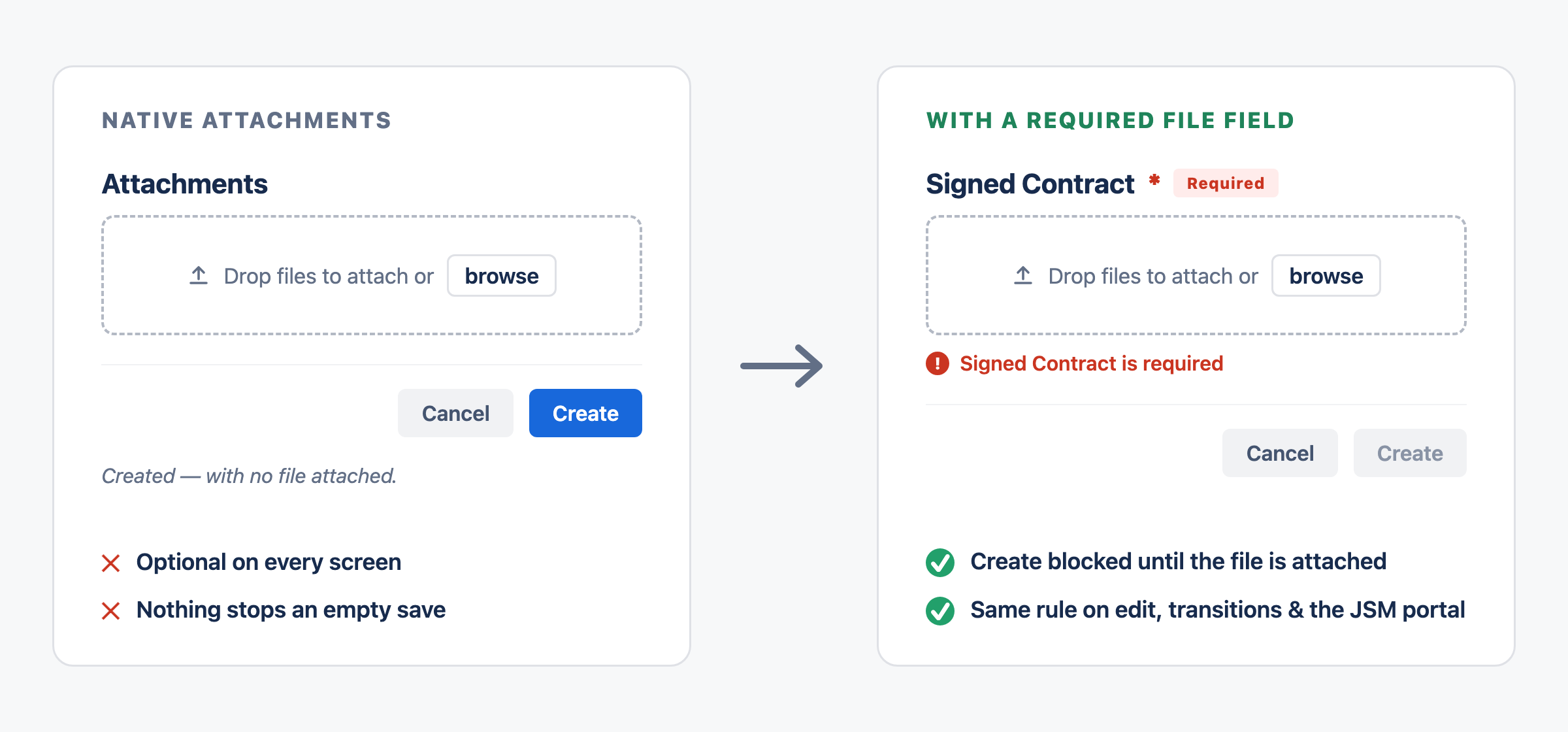
The whole article in one picture: native attachments accept an empty save; a required field refuses it
A question with a long beard
People have been asking some version of "how do I make an attachment mandatory in Jira?" on the Atlassian Community since at least 2018, and the question keeps coming back because it arrives in three different shapes:
- On create — a bug report shouldn't exist without a screenshot of the defect.
- On a transition — nothing moves to Done until the signed contract is on the work item.
- On the portal — a service request without the ID scan is just a conversation about sending the ID scan.
Native Jira has an answer for all three. It's the same answer each time, with the same blind spot — and knowing exactly where that blind spot falls is the whole point of this article. (If you'd rather read this walkthrough where those threads live, we've published a companion version on the Atlassian Community.)
What "not a field" actually costs
Attachments in Jira aren't a field. They're a separate subsystem for files linked to a work item, with a UI that happens to sit among fields — the same design that, back in 2004, led Atlassian to close the request for an attachment custom field as Won't Fix (JRACLOUD-4925).
It's tempting to conclude that nothing can therefore require them, and plenty of Community threads say exactly that. It isn't true, and the truth is more useful.
Jira has two mechanisms for making something mandatory, and they fail differently here. The Required flag in field configurations really is out of reach: field configurations list fields, and the attachments section isn't one, so there's no toggle to find. The Field Required Validator, though, doesn't read field configurations — it reads the transition screen, and Attachment can be placed on a screen. So the validator does reach attachments.
What it reaches, however, is the screen — not the work item. That distinction is the blind spot, and everything below follows from it.
What native Jira Cloud can do
The JSM portal: yes, with an asterisk
The one real native lever lives in Jira Service Management. In Project settings → Request types, put the Attachments field on the request form and mark it Required — from then on, customers can't send that request without at least one file. If "customers must attach something" is your whole requirement, stop here; no app improves on free.
The asterisk: it's portal-only, and something is the operative word. Any type, any size, one file or twenty — the form can't name the document it's waiting for, and whatever arrives joins the shared attachments pile along with the screenshots and the email signatures.
JSM forms: the same promise, the same pile
Forms attached to a request type can include an attachment question and mark it required. Same enforcement, same scope — plus two caveats of their own: forms shared publicly (without login) can't accept uploads at all, and files submitted through a form still land in the general attachments list, not anywhere a rule could later address.
The create screen: yes, through the Create transition
Creating a work item is itself a transition, so the native Field Required Validator applies to it. Put Attachment on the create screen, add the validator for that field to the Create transition, and Jira refuses to create the work item until a file is attached.
This one genuinely works, and it's the case where the blind spot below costs nothing — on create there is no earlier state to overlook. If "no bug report without a screenshot" is your whole requirement, native Jira covers it.
Workflow transitions: the validator that watches the dialog, not the work item
The same validator can guard any later transition — "no Done without the signed contract" — with two conditions that trip most people up.
First, it needs a transition screen carrying the Attachment field. Without one it doesn't pass silently; it blocks the transition no matter what is attached. Atlassian logged that as JRACLOUD-74046, then closed it with the resolution Timed out — never fixed, and never documented.
Second, and this is the part that matters: it validates the upload, not the work item. The file has to arrive in that transition dialog. The signed contract somebody attached last Tuesday, sitting right there on the work item, does not satisfy it. In practice, teams re-upload documents they already have so the dialog will let them past — which is where the mechanism stops being a control and starts being a ritual.
And in neither case can it count files or tell them apart. One file and nine look identical to it; a screenshot of the login page satisfies a rule that meant rollback plan.
Automation: a very polite guard
The last native tool works after the fact. A rule can check {{issue.attachments.size}} on a transition and, finding zero, send the work item back with a comment. Real and worth having — but it's detection, not prevention. The save already happened, and the enforcement mechanism is somebody's inbox.
The scorecard:
| Where you need the rule | Native option | What it actually enforces |
|---|---|---|
| JSM portal request | Required attachments on the request form or a form question | Some file — any type, any size |
| Jira create screen | Field Required Validator on the Create transition | Some file, uploaded on the create screen |
| Workflow transition | Field Required Validator + a transition screen | Some file, uploaded in that dialog — blind to files already on the work item |
| After the fact | Automation on {{issue.attachments.size}} | Detection, not prevention |
Read the middle column and the answer to "can Jira do this natively?" is yes. Read the right-hand one and you get the real answer: everywhere except create, Jira enforces an upload event, never the presence of a document. Nowhere can it require how many, or which.
Turn the file into a field
Read the failure again and the fix writes itself. The native checks watch an upload because an upload is all they can see — there's no field holding the document, so there's nothing to ask about. Give the document a field, and the question changes from "did someone upload something" to "does this work item hold it".
File Field registers a real Jira custom field that holds files. That single fact does all the work in this article: a real field appears in field configurations, so Required applies; it sits on create, edit, and transition screens, so the rule holds everywhere those screens are used; and it goes onto JSM request forms, so the portal enforces it too. What follows is ordinary Jira administration.
Create a field for the document
Go to Jira Settings → Work items → Fields and create a field of the File Field type. Name it for its purpose — Signed Contract, Proof of Identity, Onboarding Documents — and add it to the create, edit, and view screens of the relevant work item types. One document with its own rules = one field. (The end-to-end setup lives in the docs.)
Flip Required in the field configuration
Open Jira Settings → Work items → Field configurations, find the field, choose Required — and that's the entire configuration, documented here.
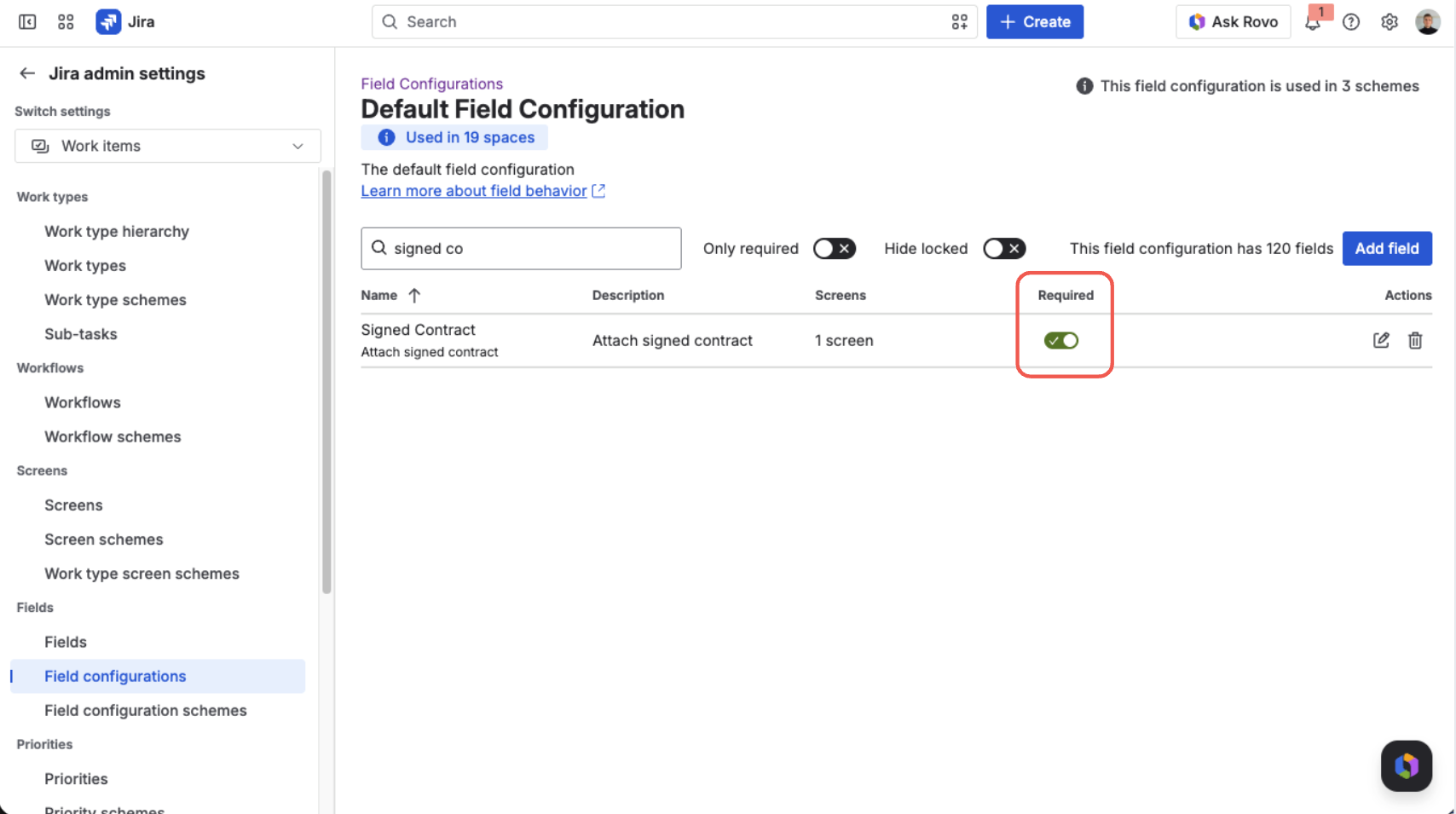
The Required toggle in Jira's field configuration — the same switch every other mandatory field uses
From here Jira enforces it like any mandatory field: the asterisk on the form, and a create, edit, or transition that would leave the field empty refused with a specific message until a file lands.
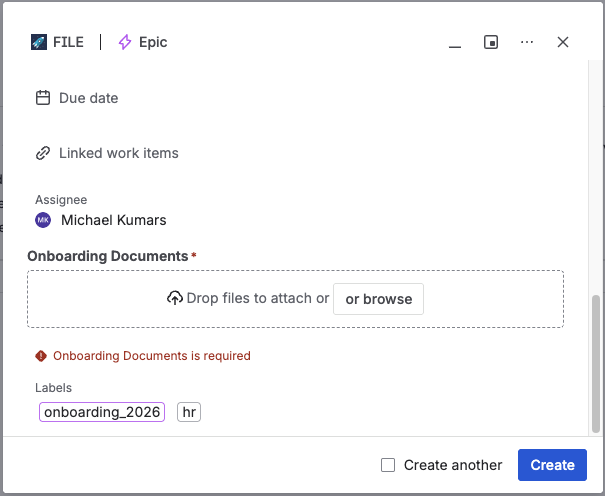
The create dialog, refusing to save until the field has its file
Put it on the portal
Add the field to the request type's form like any custom field — customers get the same drop zone, and the required rule travels with it. Sending the request with the field empty stops at the form, with Jira's own message: "Please provide a value for required field 'Signed Contract'". When the agent opens the request, the document is sitting in its named field, not fished out of the pile. Details in Use on the JSM portal.
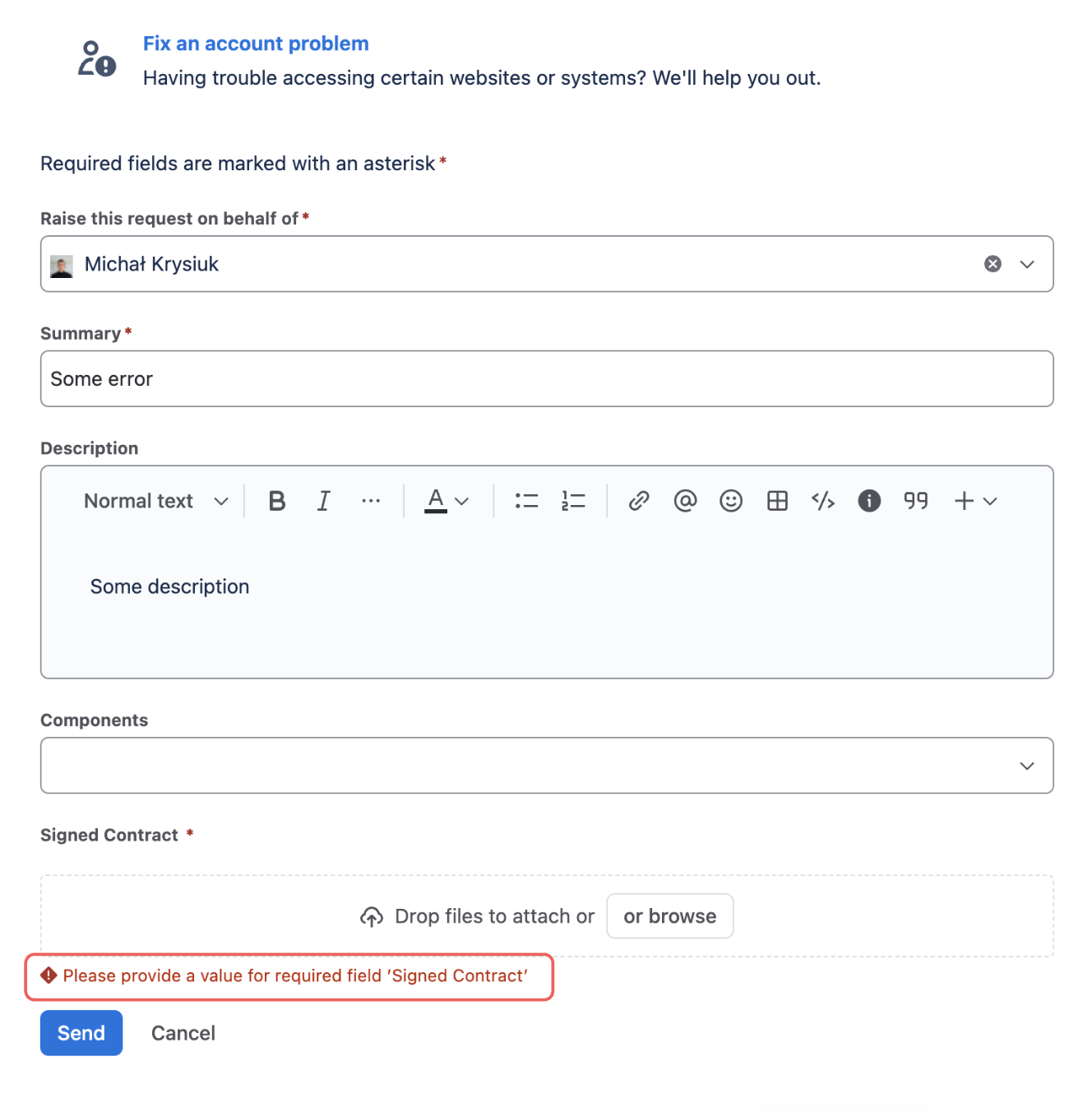
The JSM portal blocks Send until the document is attached
Make required mean the right file
Required guarantees a file exists; upload rules decide which file counts. Allowed types, maximum number of files (default is one — one field, one document), maximum size — validated before upload, so the user gets an immediate, specific error rather than a failed save. Rules live on the field's context, so the same field can be strict in Legal and relaxed in Marketing. Together with the Required flag, "one PDF, at most 10 MB, and it must be present" becomes something Jira enforces on your behalf.
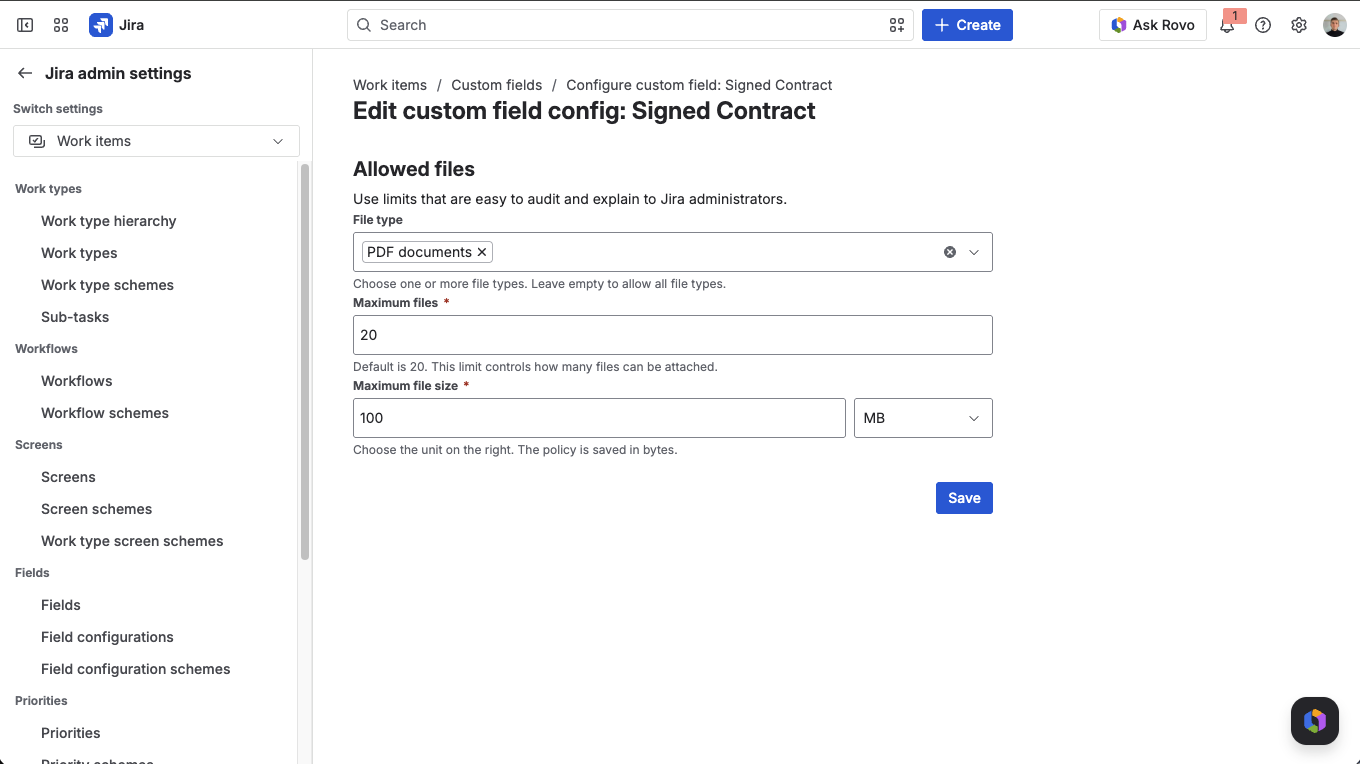
Upload rules on the field's context: which types, how many, how large
Audit the gate
Every gate has a backlog problem: work items created before the rule existed, bulk imports, a project the field's context didn't reach yet. Native JQL can't surface them — it has no way to ask whether a work item carries a file. A File Field can, because it answers is EMPTY like any other field:
project = HR AND statusCategory != Done AND "Onboarding Documents" is EMPTY
Saved as a filter, that's an audit dashboard. Used as a JQL condition in Automation, it upgrades the "polite guard" from earlier — pointed at the one document that matters instead of "any attachment". The pattern, with more queries, is in Find Jira Issues Missing an Attachment, Now with JQL.
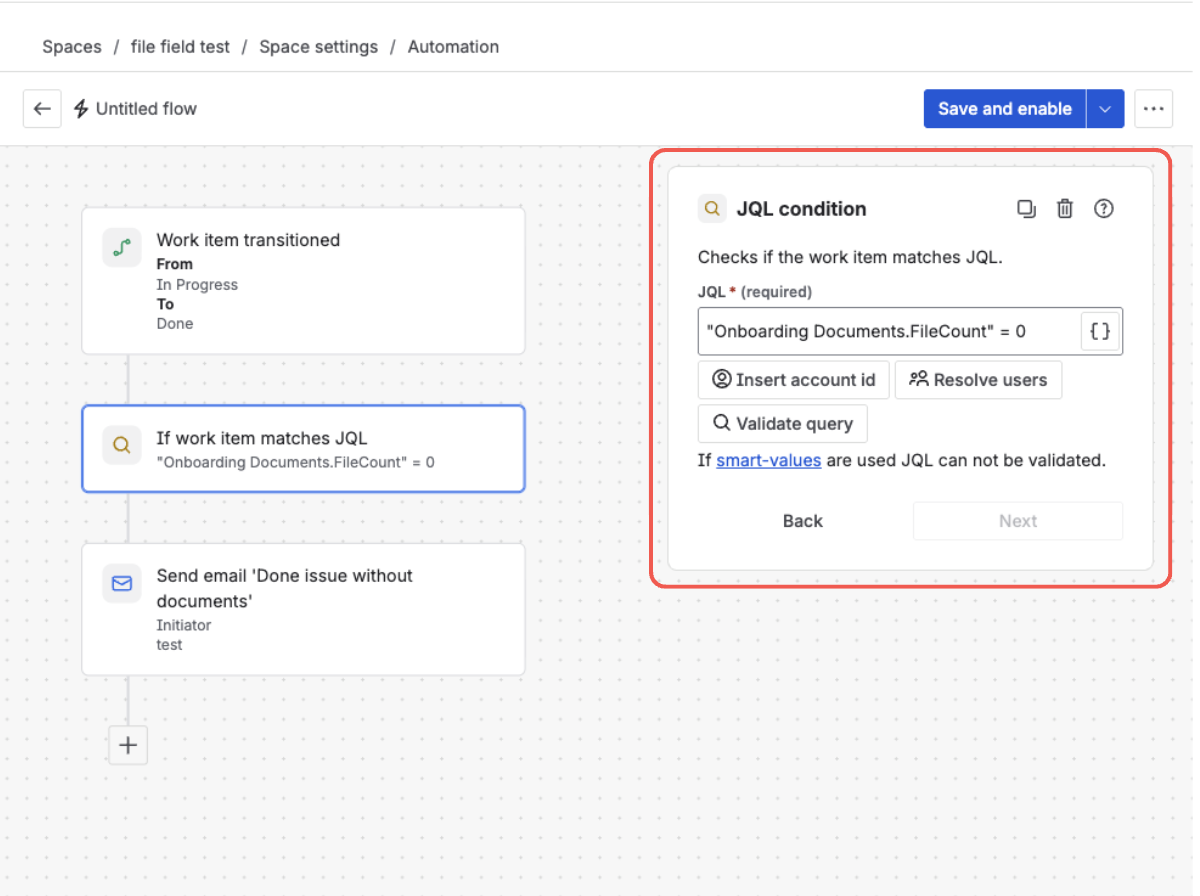
The same emptiness check, working as a JQL condition inside an Automation rule
Make the missing file impossible
File Field adds a native attachment custom field to Jira and JSM — required where you need it, with rules for what counts. Free trial on the Atlassian Marketplace.
Try File Field on MarketplaceWhere teams use it
- JSM intake — an ID scan or proof of purchase the request literally cannot be raised without.
- Approvals and compliance — a Signed Contract gate before work moves on, plus a saved filter that hands auditors the exceptions list.
- HR onboarding — an Onboarding Documents field that must be filled before day one, restricted to the formats HR actually accepts.
Frequently asked questions
Can you make an attachment mandatory in Jira Cloud? Yes, in all three places — the JSM portal request form, the create screen, and a workflow transition — but each native check only enforces that a file was uploaded in that dialog, never that the work item holds a particular document. None of them can require a number of files or a specific kind. A file custom field answers those questions, because it's a real field.
Can a workflow transition require an attachment? Yes, with a caveat that decides whether it's useful to you. Add the Field Required Validator for Attachment and a transition screen carrying that field, and Jira blocks the transition — but only until someone uploads a file in that dialog. A document already attached to the work item doesn't count. With a File Field the check reads the field's contents instead, so files attached at any time satisfy it, and a workflow rule can additionally demand a minimum count and a file in each category you name.
Can an attachment be required in one project but optional in another? Yes — that's native Jira behaviour once the file lives in a field. The Required flag sits in a field configuration, and each project's field configuration scheme decides which configuration applies, so the same field can be mandatory in Legal and optional everywhere else.
Can you require a specific document, not just "any attachment"? Not with native attachments — every native rule, on the portal or on a transition, enforces "at least one file of any kind". A dedicated field per document (Signed Contract, ID scan) makes the requirement specific, and upload rules pin down type, count, and size.
How do you find work items that are missing a required file?
Native JQL can't see attachment presence. A File Field exposes "Field name" is EMPTY, which works in filters, dashboards, and as a JQL condition in Automation rules.
One field, one document, zero chasing
Stop asking for the file in comments. Make it a required field with rules, and let Jira do the enforcement. Free trial on the Atlassian Marketplace.
Start free trial on Marketplace