Find Jira Issues Missing an Attachment, Now with JQL
Here is a question Jira can't answer out of the box: which of these 200 issues is still missing its file? Native attachments live in one shared bucket that JQL can't see into — you can't count them, filter by them, or build a report of what's missing. File Field turns attachments into a real, searchable field, so "find every issue with no evidence yet" becomes a one-line query — and now a saved filter, a dashboard, and an automation rule.
TL;DR
Jira's built-in Attachment field isn't searchable in JQL, so you can't audit which issues are missing a document. File Field exposes four search dimensions — FileCount, FileType, FileName, and Categories — that work like built-in fields, and answers is EMPTY like one too. The one that changes the most: "File Field" is EMPTY finds every issue with nothing attached. Jump to the missing-evidence query.
The question Jira can't answer
Plenty of teams treat an attached file as proof: the signed contract, the QA screenshot, the compliance certificate, the customer's log bundle. The work isn't really done until the file is there.
So the natural question is: which issues are still missing theirs?
Try to write that in JQL against Jira's native Attachment field and you hit a wall. Attachments aren't a searchable field — there's no Attachment is EMPTY, no way to count them, no way to filter a board or feed a dashboard by "has a file / has no file." The files are there on each issue, but they're invisible to the one tool everyone uses to slice Jira: search.
Why native attachments can't be audited
This gap is exactly what people have been asking Atlassian to close for years — a real attachment field has been a long-standing, highly-voted request on the Jira roadmap. The native Attachment area has three limits that matter here:
- One shared bucket. Every file lands in the same pile, with no way to tell "the signed contract" from "a random screenshot" programmatically.
- Not searchable. JQL can't see attachment count, type, or name, so there's no missing-evidence report and no board filter.
- All-or-nothing rules. You can't require or restrict attachments for one project or request type without changing behavior for the whole instance.
You end up eyeballing issues one by one, or building brittle workarounds. Neither scales past a handful of issues.
Files become a searchable field
File Field is a native custom field you add to Jira and Jira Service Management. Because it's a first-class field, everything you put in it is searchable — it shows up in the JQL editor's suggestions, in saved filters and boards, and in automation conditions, just like Assignee or Priority.
It answers the plain is EMPTY question the native Attachment field can't, and exposes four search dimensions on top of it:
| Search on | Answers |
|---|---|
| the field itself | Is anything attached at all? |
FileCount | How many files are attached? |
FileType | Is there a PDF / image / spreadsheet? |
FileName | Is there a file named like this? |
Categories | Is there a file labeled Contract / Invoice? |
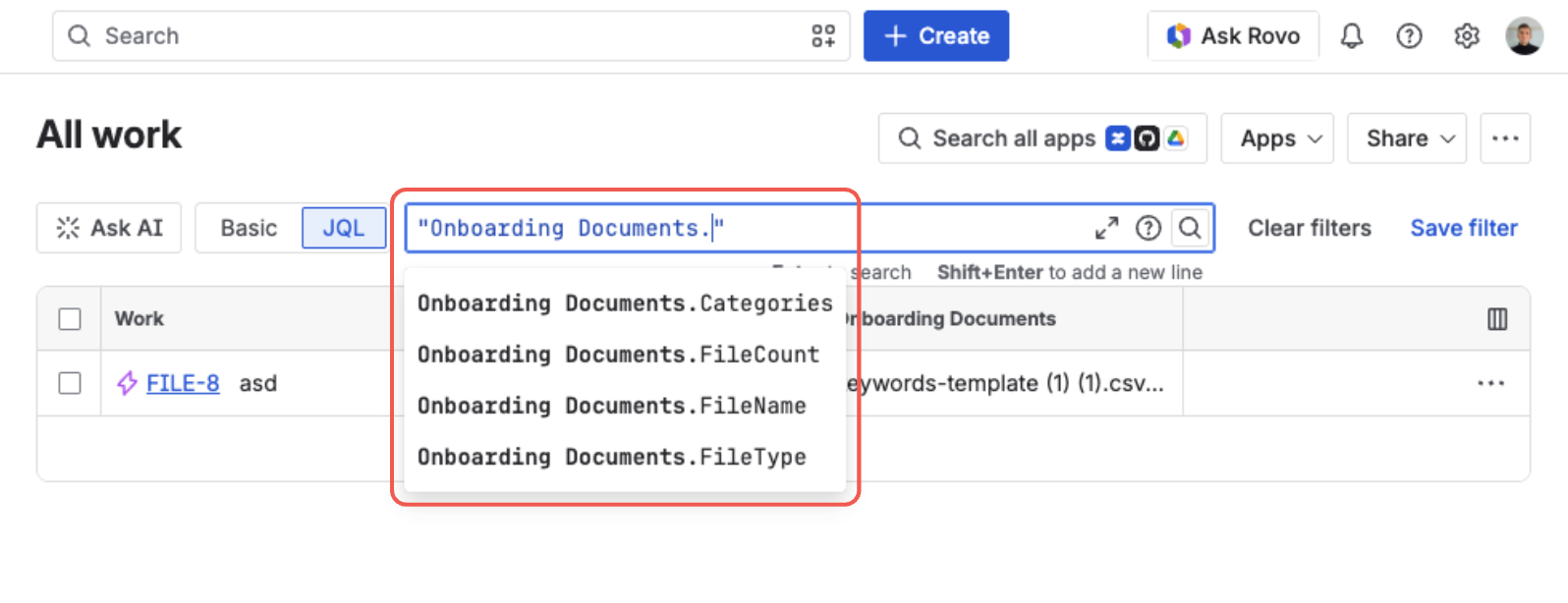
The field's search dimensions show up in the JQL editor, just like a built-in field
The full syntax and every operator live in the Find Issues by Their Files (JQL) documentation — this post is about the one query that earns its keep.
The missing-evidence query
Attachment is EMPTY is the query Jira won't accept. On a File Field, it's the one that finds every issue with no proof on file:
"File Field" is EMPTY
That's the whole audit. Narrow it to what you actually care about — open issues in a project that should already have a document:
project = COMP AND statusCategory != Done AND "File Field" is EMPTY
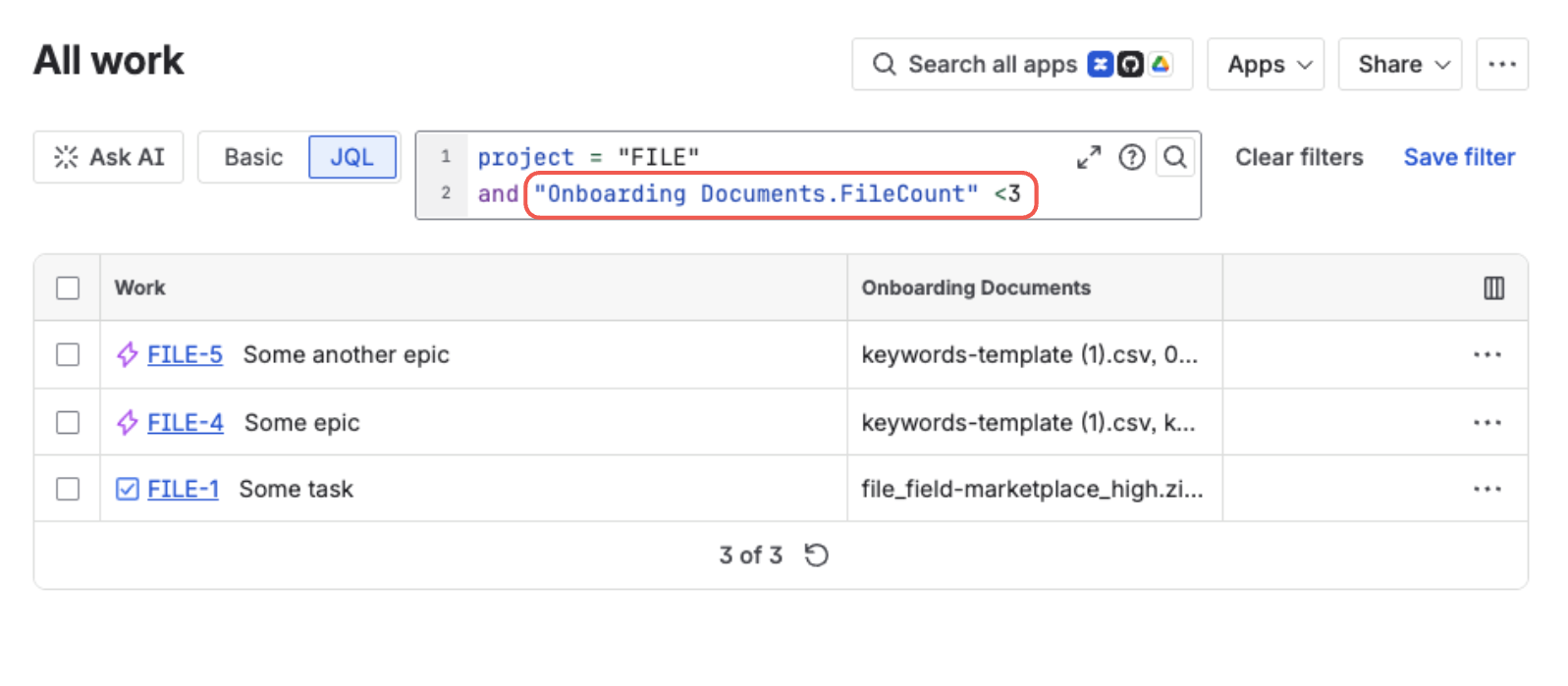
A File Field query and its results — matching issues, with their files shown as a column
The dot after the field name matters — "File Field.FileCount" searches a specific dimension, and the quotes go around the whole expression, not just the field name. is EMPTY asks about the field as a whole, so it takes no dot. If your admin renamed the field, use that name and wrap it in quotes: "Signed Contract" is EMPTY.
Save that query as a filter and you've got a missing-evidence board or a dashboard gadget that stays current on its own — no manual review, no spreadsheet.
Make attachments searchable in Jira
File Field adds a native, searchable attachment field to Jira and JSM — count, type, name, and category, all in JQL. Free trial on the Atlassian Marketplace.
Try File Field on MarketplaceNot just present — the right kind
Presence is the start. Often the real requirement is a specific piece of evidence, and the other dimensions cover that:
-- has files, but none of them is a signed PDF
"File Field" is not EMPTY
  AND "File Field.FileName" !~ "signed"

-- has attachments, but no spreadsheet among them
"File Field" is not EMPTY
  AND "File Field.FileType" not in ("Spreadsheet")

-- issues tagged with a contract on file
"File Field.Categories" = "Contract"
FileType groups files into broad families (PDF, Image, Word, Spreadsheet, CSV, Text, Archive, Other), so you write PDF instead of application/pdf. Categories searches the labels you assign to files — see Classify Files with Categories.
Close the loop with automation
Finding gaps is useful; catching them automatically is better. The same expressions work as JQL conditions in Jira automation. A common rule:
When an issue transitions to Done while
"File Field" is EMPTY, comment on the issue, notify the assignee, or flag it for follow-up about the missing document.
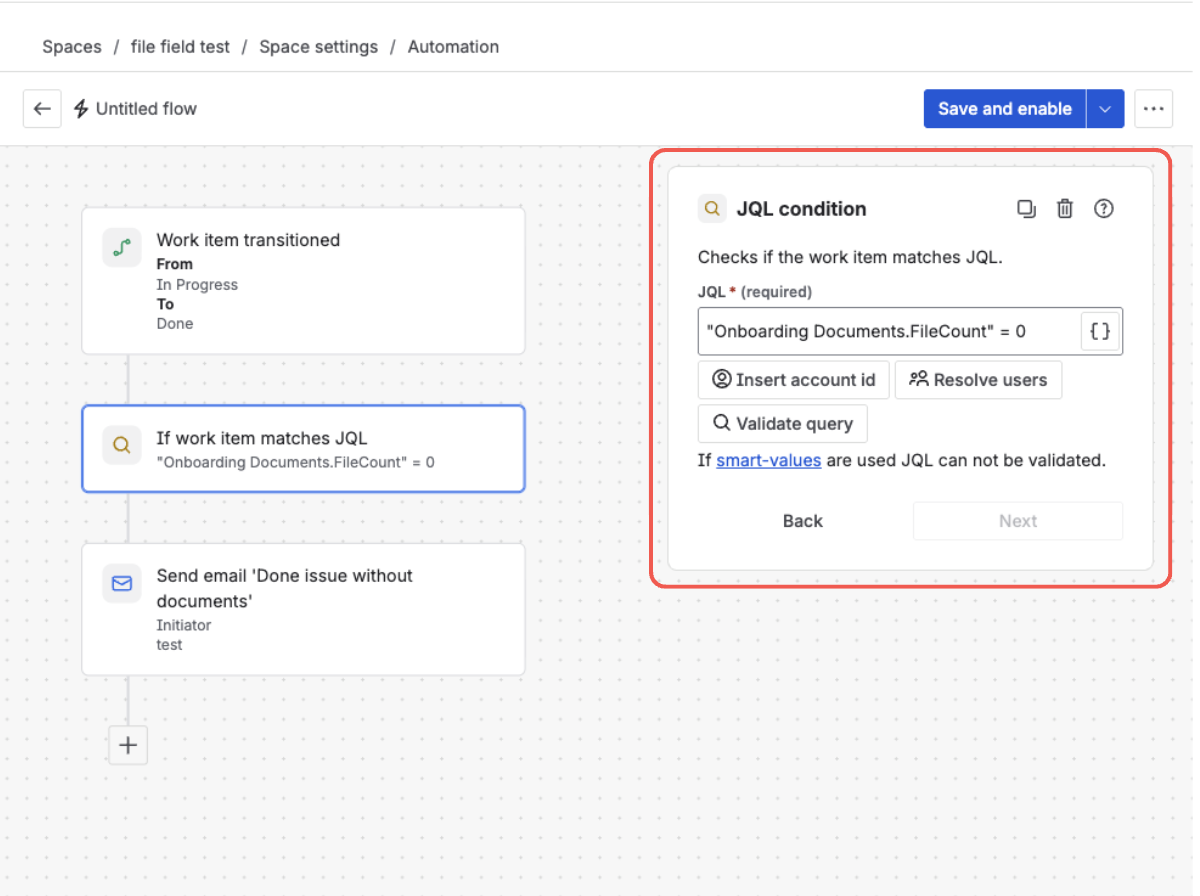
A File Field JQL condition in an automation rule — catching Done issues with no file attached
Now "the file is missing" isn't something a person has to remember to check — it's a query the system runs for you.
Automation can fill the field as well as react to it: a rule can carry a File Field's files onto a work item it just created, which is covered in Carry the Right Files to a New Jira Work Item.
Availability
JQL search is available now on File Field. Every dimension works everywhere Jira uses JQL — saved filters, boards, dashboard gadgets, list-view columns, and automation conditions. Two things worth knowing:
- File-name search matches whole words.
FileName ~ "report"matchesreport.pdf, but won't findreportinside a longer word. - Older issues index after the field is saved again. Issues whose File Field hasn't been touched since JQL search was turned on start matching
FileCountandFileTypequeries once the field is edited and saved. - A field emptied before 20 August 2026 needs one save. Until that release, removing the last file left an empty-but-present value behind, which
is EMPTYdoesn't match — those issues answer"File Field.FileCount" = 0instead. Open the field for editing and save it to clear the leftover, or cover both with"File Field" is EMPTY OR "File Field.FileCount" = 0.
See the full reference and more examples in the JQL documentation, or the changelog for what's new.
Frequently asked questions
Can I search Jira attachments in JQL? Native Jira attachments aren't searchable in JQL — there's no attachment count or "is empty" operator. File Field adds a native custom field whose files are fully searchable by count, type, name, and category.
How do I find Jira issues with no attachment?
Use is EMPTY. For example, project = COMP AND statusCategory != Done AND "File Field" is EMPTY lists every open issue in the project with no file attached.
Can I filter Jira issues by file type in JQL?
Yes. FileType groups files into broad families — PDF, Image, Word, Spreadsheet, CSV, Text, Archive, and Other — so you can write "File Field.FileType" = "PDF" or use in / not in to match several at once.
Can I use a File Field query in Jira automation?
Yes. Every expression works as a JQL condition in automation — a common rule comments on, flags, or notifies the assignee of an issue that reaches Done while the field is EMPTY.
Does File Field JQL search work on Jira Service Management? Yes. File Field works on Jira and JSM, including the customer portal, and its JQL dimensions are searchable across both.
Turn 'is the file there?' into a query
File Field makes file attachments a searchable field in Jira — audit missing evidence, filter by type, and catch gaps with automation. Free trial on the Atlassian Marketplace.
Start free trial on Marketplace