Files From People Without a Jira Account: What Jira Cloud Does and Where It Stops
Sooner or later a work item waits on a file held by someone with no Jira login: a supplier's certificate, a client's signed form, a subcontractor's drawings. Jira Cloud has several answers, and the best known one changed recently. Public forms started accepting attachments at the end of 2025, so plenty of advice online still says they can't. We submitted one with no session on a Jira Cloud site in November 2026, opened a JSM portal the same way, and read the current documentation for everything else.
TL;DR
- They send you a file, software or business space: a public form, up to 100 MB per file, and no account on their side.
- They send you a file, service space: the JSM portal, where they get a customer account, or email, up to 25 MB per message.
- You send them a file: JSM secured attachment links last 28 days. In other spaces the built-in option is guest access, which needs an Atlassian account.
- One named person and a work item that already exists: the built-in routes fit badly. An app like Secure File Exchange puts a link with its own expiry on it. Jump to that setup.
If you'd rather read this where the question keeps coming up, there's a companion version on the Atlassian Community.
Can someone without a Jira account upload files to Jira?
Yes. In software and business spaces the most direct way is a public form: whoever holds the link can fill it in and attach files.
Build the form
On the space's Forms tab, select Create form and make sure it has an Attachment field. You need space admin permissions for this.
Make it public
Open Form access, choose Public and pick a Reporter, the Jira user every response will be filed under. Jira then asks you to confirm that anyone with the link can respond.
Share the link
Copy it from Share and send it, or publish it on a page.
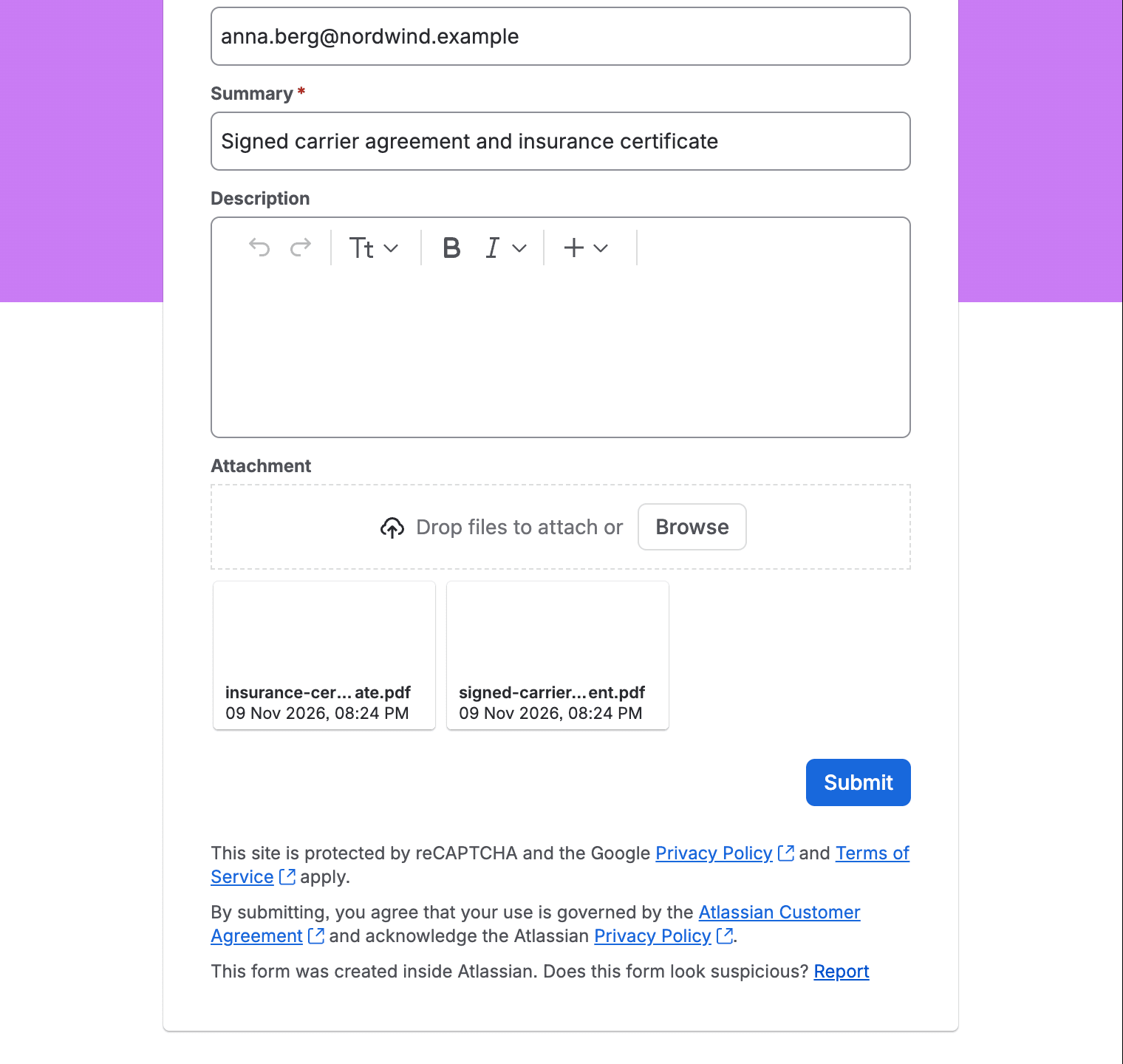
What the other person sees, with no sign-in: their email address, the form's fields and two files attached
Our test response became an ordinary work item with both files on it. Four things are worth knowing before you depend on this:
- There's no topping up. Each response opens its own work item (Atlassian docs), so a second batch of files means a second work item.
- Everything is filed under your default reporter. Jira credits that user with the work item and the files. To see who really sent them, open the comment Jira adds automatically; it holds the address from the form.
- Files can be up to 100 MB each, according to the same page.
- A public form is open-ended. You can't give it an end date or a password, so it takes responses until someone deactivates it. reCAPTCHA is there for the bots.
What if you run Jira Service Management?
Service spaces don't get public forms. The request to add them, JSDCLOUD-17019, is open with 12 votes. You have the portal and email instead.
The portal costs no Jira license, but it does give the customer an account. With anonymous access turned on, they only type an email address to send a request, the account appears with it, and they set a password later if they want to see that request. With it off they log in first: a portal opened with no session on our test site landed us on a page reading "Enter your email to log in or sign up". Whether outsiders can register at all also depends on what your organization admin has shared.
Email has no form and no sign-in. People writing to the service address don't need a license to open a request, comment or send files, but a message above 25 MB including attachments never gets fetched. Your customer permissions decide the rest: if anyone can email the space, each new sender becomes a customer, and if customers are added by hand, mail from unregistered senders isn't processed.
Incoming mail on a non-service space is aimed at licensed users, though a default reporter can pick up messages from unknown addresses.
Two more routes in company-managed spaces
If you have a website and a Jira admin to set it up, the work item collector puts a feedback form on one of your pages. Attachment is one of the fields you can add, and whoever fills it in needs no Jira account. Team-managed spaces can't use it.
The bluntest route is a permission scheme. Standard, Premium and Enterprise sites can grant Create work items and Create attachments to Public, and anyone on the web can then file work in that space. We didn't try it on our test site.
How do you send a file to someone outside Jira?
There's less to choose from in this direction.
- Secured attachment links (JSM, Standard and above). A per-space setting lets customers download attachments from their notification emails without logging in. Each link lasts 28 days and works for whoever has it.
- Automation emails. Send customized email can carry up to 10 files and 4 MB in total, but those are files stored in the rule. Attaching the work item's own files is a request with 98 votes, AUTO-1130.
- Guests. On Standard and above, a guest doesn't take a paid seat. They sign in with an Atlassian account and are limited to one software or business space, which suits a long collaboration better than a single file.
Every route side by side
| What they need | Route | Way | Size | The catch |
|---|---|---|---|---|
| The form link | Public form | In | 100 MB per file | New work item each time, no expiry or password |
| Your web page | Work item collector | In | Not documented | Company-managed only |
| A mailbox, if the space takes mail from anyone | JSM email | In | 25 MB per message | Size limit; they become a customer |
| A mailbox | Automation email | Out | 4 MB in total | Files stored in the rule |
| To be a customer on the request | Secured attachment link | Out | Not documented | JSM only, 28 days |
| A customer account, or an email address with anonymous access on | JSM portal | In | Your site's limit, 1 GB by default | An account is created either way |
| An Atlassian account | Guest access | Out, and in if permitted | Your site's limit | One software or business space |
One person, one work item
Now take a narrower job. A work item is already open and a single supplier contact owes you a certificate. A form would open a second work item, and guest access is a lot of setup for one PDF. What you want is a link tied to that work item that stops working when the job is done.
We couldn't find a built-in link that lets you set the expiry, add a password or cap the downloads. Logging attachment downloads in the audit log is still a suggestion with 101 votes, JRACLOUD-75654.
That gap is why we built Secure File Exchange, so the rest of this section is about our own app. Other file-sharing apps on the Marketplace cover parts of it too.
Open the panel
On the work item, choose View app actions, then Secure File Exchange. You get Request files and Send files.
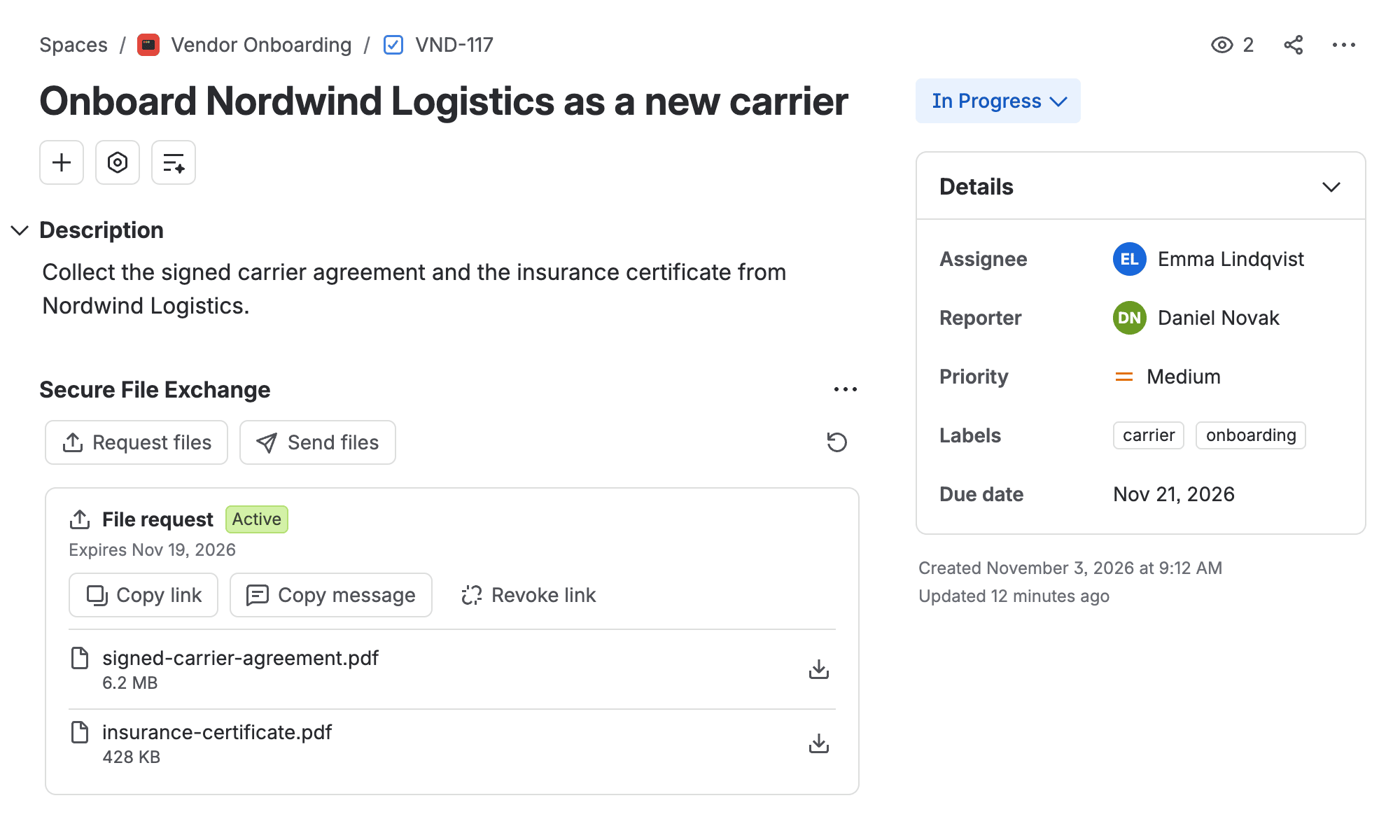
A file request on the work item it belongs to
Create the link
Set how long the link lives and what kinds of file it takes. A password is optional. Then select Create link. Your Jira admin decides the limits on the Policies page.
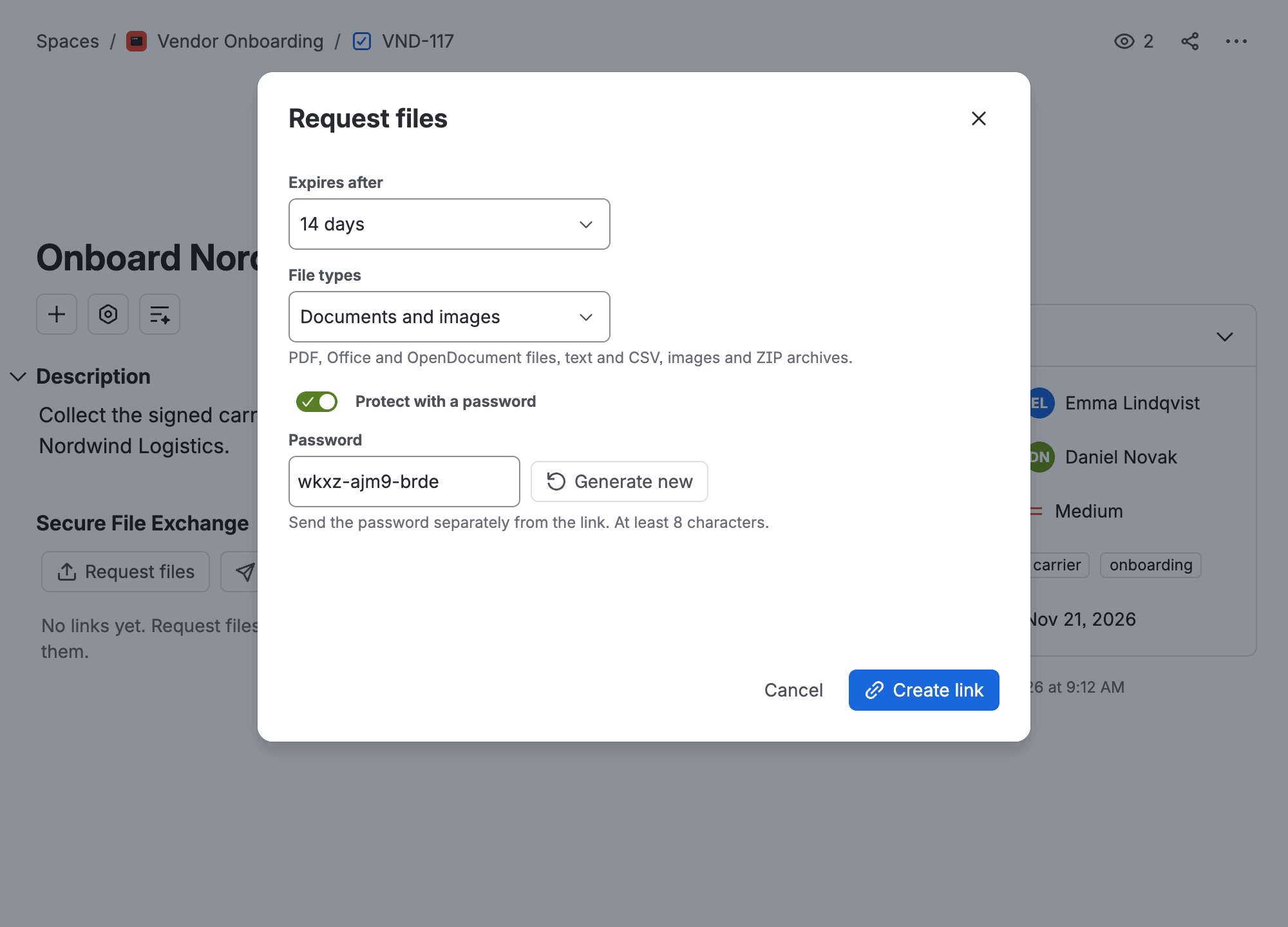
Expiry, file types and an optional password, per link
Pass it on
The app doesn't send mail, so use Copy message and paste the result wherever you normally talk to this person. On their side there's a browser page with room for 50 files of up to 1 GB each, and nothing to install or sign up for.
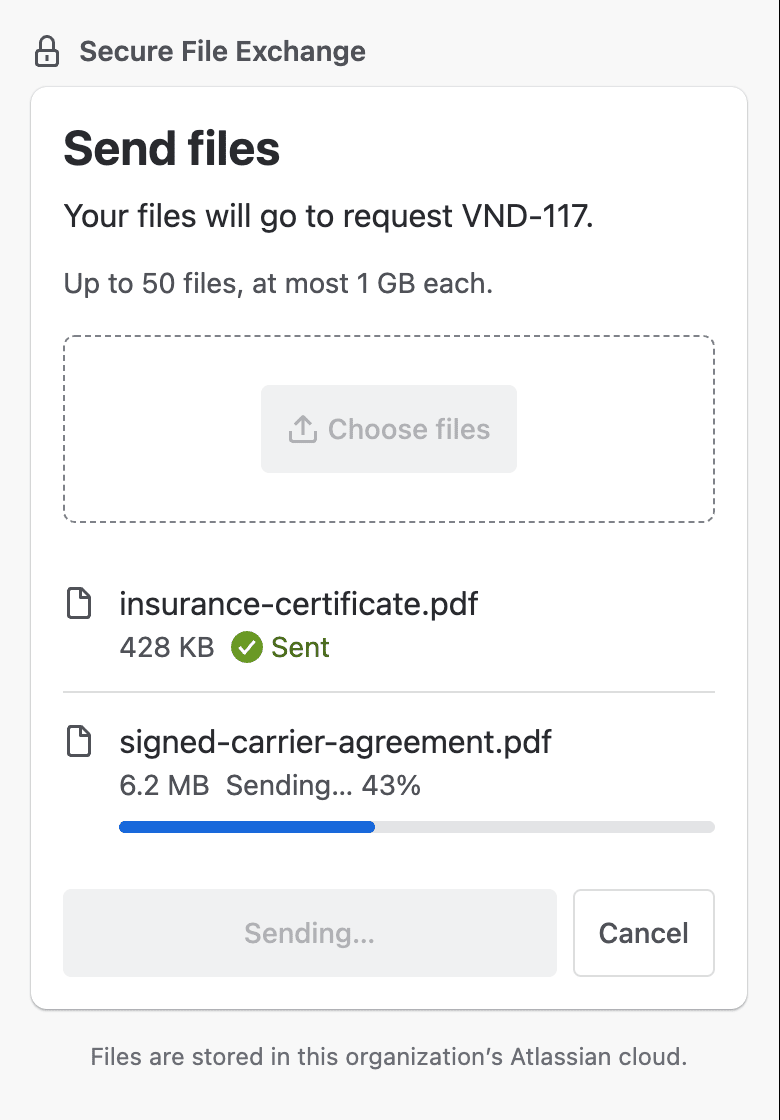
The upload page works on a phone too
Collect the files
You'll know the upload is done because the app mentions you in a comment, which on a service space is an internal note. For the opposite direction, Send files creates the same kind of link and can cap downloads; its card in the panel shows how many were used.
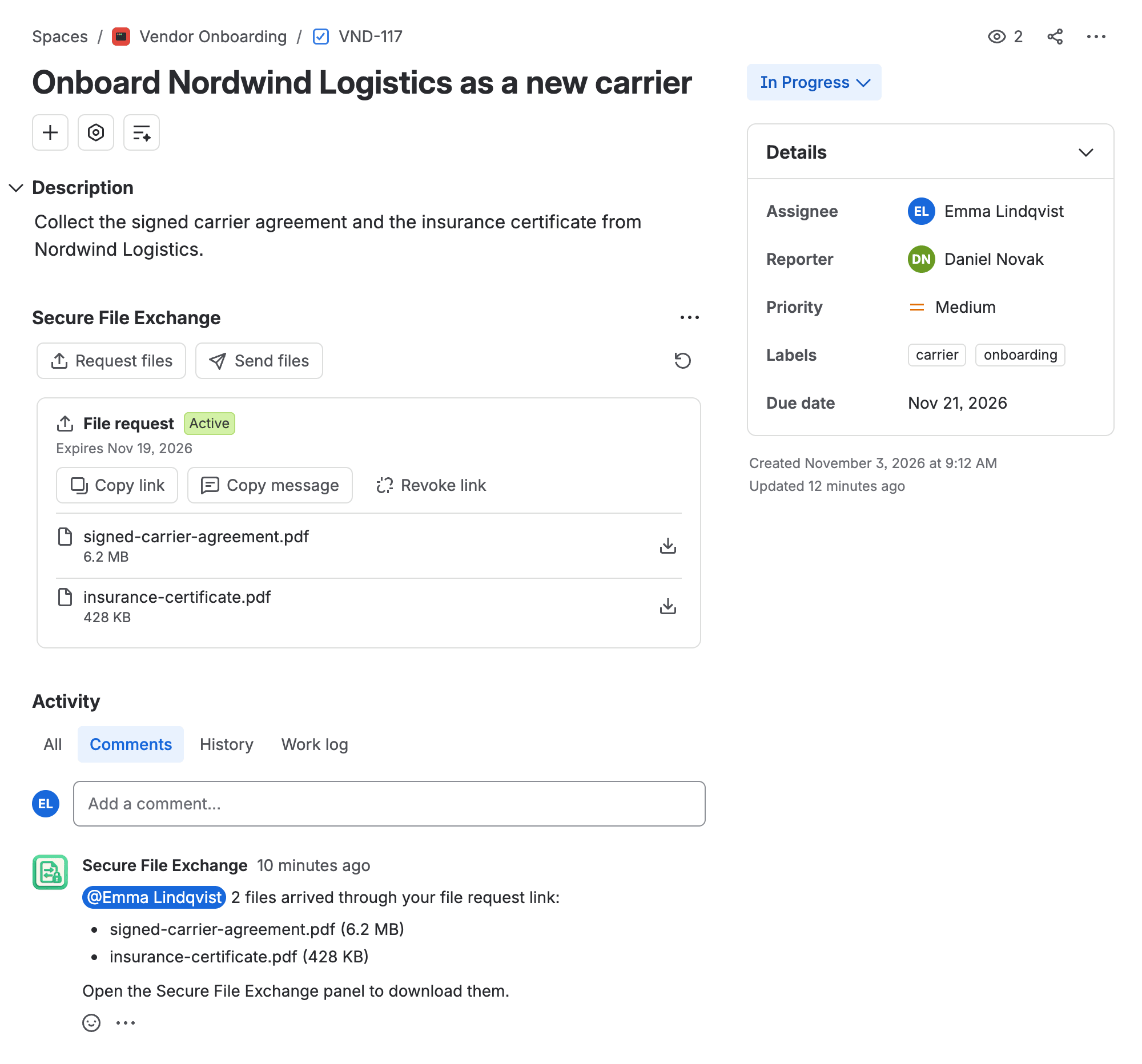
The comment tells you the files are in
Before you choose it
The app keeps received files in its panel, not in Jira's attachments, and deletes them when the retention period after the link ends runs out, 30 days by default. Download and attach whatever the work item needs for good. Nothing scans these uploads for viruses, so handle them as you would an email attachment. More on what the other person sees.
Check what your site already exposes
If you've never looked, three checks take a few minutes:
- Whether public forms are on at all. Look for the Public forms sharing toggle in Jira's configuration. Team-managed and company-managed spaces each have their own setting.
- Whether any permission scheme grants Browse spaces, Create work items or Create attachments to Public.
- What has arrived through public forms lately, using the comment Jira adds to each response:
comment ~ "\"response to a Jira form\"" AND created >= -30d
FAQ
Do public Jira forms support attachments?
Yes. Attachment support arrived at the end of 2025, with a cap of 100 MB per file, so threads written before then no longer apply.
Can a Jira Service Management form be public?
No, as of November 2026. Public sharing covers software and business spaces, so a service space takes outside requests through its portal or email.
Can an outside person add files to an existing work item?
On a service space, someone already on the request can, by replying to its notification email. By default a reply from anyone else creates a new work item. A public form always opens a new work item.
Does a guest need an account?
Yes, an Atlassian account, and guest access requires a Standard plan or above.
A file request on the work item it belongs to
Create a link on the work item, send it, and get a comment when the files arrive. The other person needs no Atlassian account.
Get it on the Marketplace