Use Jira Automation Action
Automation Actions for Issue Templates
Bring Issue Templates into Jira Automation using native, secure Forge actions.
Templify allows you to automate template-based workflows directly inside Jira Automation — with the template's hierarchy, links, attachments and dynamic fields.
Templify actions in Jira Automation
Instead of relying on external APIs, webhooks, or custom scripts, Templify integrates natively with Jira Automation using official Atlassian Forge Automation Actions.
Automation Actions
Templify provides two native automation actions related to Issue Templates.
These actions behave like any other Jira Automation component — they can be added, configured, combined with conditions, and reused across projects.
- Create issue from template
- Apply issue template
Creates a new issue from an Issue Template every time the rule runs, together with the template's child issues, sub-tasks, links and attachments.

Create issue from template action
Typical use cases:
- Create recurring work, such as a weekly checklist, from a scheduled rule
- Create release checklists automatically
- Provision standardized task hierarchies from automation rules
Learn more: Create issue from template
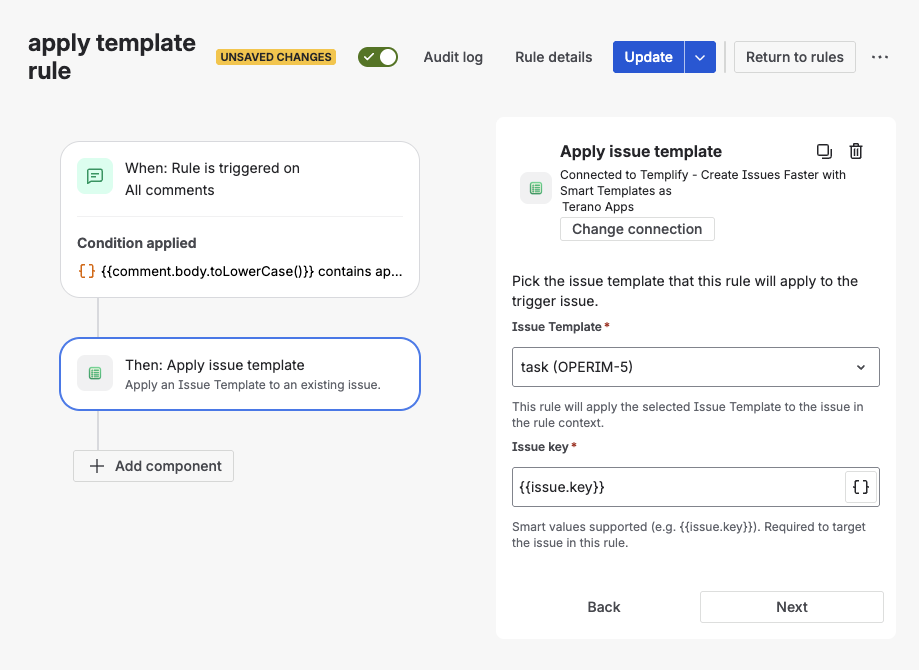
Applies an Issue Template to an existing issue: fills in its fields and can add the template's sub-tasks, child issues and links to it.

Apply issue template action
Typical use cases:
- Enrich issues after creation (e.g. via comment, label, or status change)
- Add a standard set of sub-tasks to manually created issues
- React to user actions such as comments or field updates
Learn more: Apply issue template
How Automation Actions Work
Once Templify is installed, its actions become available directly in Jira Automation:
Open Automation Settings
Go to Space settings → Automation.
Create or Edit a Rule
Create a new automation rule or open an existing one.
Add an Action
Add a new Action step to your rule flow.
Select Templify Action
Search for Create issue from template or Apply issue template. Jira lists both under Other apps.
Configure Inputs
Pick the Issue Template. Apply issue template also asks for the Issue key of the issue to update:
{{issue.key}}by default. It is the only input that accepts smart values.
From that point on, Templify does what it does when someone uses the template by hand, with one difference: placeholders in the template's Summary and Description, such as {Employee name:textfield}, are not filled in, because no one is there to fill in the form. They appear in the issue as written. Dynamic fields, such as relative dates and the active sprint, work as usual.
Each action shows the account it is connected as (Connected to … as). Templify creates and edits issues with that account's Jira permissions, and a Current user dynamic value refers to that account, not to the person who triggered the rule.
Why Use Automation Actions?
Templify is built on the official Jira Automation Action API, not on exposed REST endpoints.
This design provides clear advantages:
- Security-first architecture
No public APIs, no webhooks, no shared secrets. All execution happens inside Atlassian's trusted Forge runtime. - Enterprise-ready by default
Fully compliant with Atlassian Cloud security, permission models, and auditability. - Zero infrastructure to maintain
No servers, no scaling concerns, no background services to monitor.
- Native Jira Automation experience
Actions appear in the same action picker as Jira's built-in automation steps (Create issue, Transition issue, Send email). - Works with the rule's issue
Apply issue template updates the issue the rule runs on, or any issue a smart value points to. Create issue from template creates the new issue in that issue's project.
What You Can Automate
By combining Jira triggers, conditions, and Templify actions, you can automate:
- Structured issue creation with Epics, child issues, and subtasks
- Applying templates based on comments, labels, or issue types
- Fully automated onboarding or incident workflows
- Consistent issue enrichment after creation
- Large-scale standardization without user interaction
All while keeping everything inside Jira Automation.
Summary
Templify extends Jira Automation with native Issue Template actions, allowing you to automate structured issue creation and template application securely and reliably.
No external APIs.
No custom webhooks.
No compromise on structure, permissions, or consistency.
If you already use Jira Automation — Templify lets you bring Issue Templates into those workflows naturally.
See our blog guide: How to automate Epic-to-Task workflows with Jira Automation and Issue Templates — real-world examples of onboarding, release, and incident automation rules.