Make a Jira Field Read-Only After Closed (Except for One Group)
Two fields, Number of Users and Effort in Hours, get settled when a work item closes. After that they should stay put: visible to everyone, editable only by the one team that sometimes has to correct them. And the workflow is off-limits, so no new transition. That is the exact question someone asked on the Atlassian Community, and it maps neatly what Jira Cloud can and can't do with edits. The short version: Jira locks screens and whole work items, not single fields.
TL;DR
Jira Cloud has no field-level edit permissions. Natively you can lock the whole work item in Closed with a workflow status property, or take the fields off the Edit screen and route every change through a guarded transition or a manual Automation rule. Locking just these two fields, just in Closed, for everyone outside one group takes a rule in an app like Formify: one condition on the status, one on the group, and the workflow stays as it is. Jump to the setup.
Why Jira can't scope an edit to one field
Jira decides who may edit at two levels, and neither of them is a field. The permission scheme grants Edit work items for a work item as a whole. Screens decide which fields appear when you create, edit or view one. Atlassian's knowledge base says it plainly: Jira Cloud "does not natively support field-level restrictions based on roles, groups, or transitions" (Atlassian KB).
So every native answer to this question picks one of those two levels and pays for it somewhere.
Three native routes, and what each one costs
1. A guarded transition with its own screen
Take the two fields off the Edit screen so nobody can change them in place. Then add a transition from Closed back to Closed (or a second transition into Closed) with a condition that only the chosen group passes, and a transition screen that holds both fields. This is the answer most Community threads give, and it works.
It costs exactly what the question ruled out: a new transition. And because the Edit screen applies in every status, the two fields also stop being editable in place long before the work item is Closed.
2. A permission property on the Closed status
Workflow properties let a status change who may edit. jira.issue.editable set to false freezes the work item for everyone in that status, which is too much here. To keep one group editing, add jira.permission.edit.group (it takes a group ID, not the group name) and jira.permission.edit.user (an account ID) to the Closed status, and in Closed only that group and that person can edit the work item (Atlassian docs). No transition is added, and the property only takes access away: those people still need Edit work items in the permission scheme.
The catch is scope. The restriction covers the entire work item, so Summary, Labels and every other field freeze along with the two you cared about. It is also still an edit to the workflow configuration, and Atlassian's own page warns that some properties may cause bugs.
3. View screen only, plus a manual Automation rule
Keep the fields on the View screen but not on the Edit screen, so they show up and can't be changed in place (Atlassian KB). Then build a manual Automation rule: set Groups that can run trigger to your group, use Get input from users for the new values, and add a condition that the status is Closed (Automation triggers). The workflow isn't touched at all.
The costs: as in route 1, the fields are locked in every status, not only in Closed. Editing becomes "run a rule from the menu". Team-managed spaces have no screens to work with. And there is a leak: a field missing from the Edit screen can still be edited inline from the List view, which Atlassian closed as Won't Do (JRACLOUD-95659).
| Route | What it locks | Workflow change |
|---|---|---|
| Guarded transition | Chosen fields, in every status | A new transition |
| Permission property | Whole work item, only in Closed | A property on Closed |
| View screen + Automation | Chosen fields, in every status | None |
| Formify rule | Chosen fields, only in Closed | None |
The gap is the last row: one field, one status, one exception. That is the shape this question keeps taking on the Community.
Lock two fields after Closed with one rule
Formify adds rules to the work item view itself. A Read-only rule on a field takes conditions, and a status condition is re-checked live: when the work item moves into Closed the field locks, and when it moves out the field unlocks, without a page reload.
Install Formify
Add Formify - Dynamic Fields for Jira from the Atlassian Marketplace. Installing needs a Jira admin; setting up rules needs the Administer spaces permission in the space.
Open the field's Read-only tab
In the space, open Space settings → Apps → Formify, switch to the Issue View tab (team-managed spaces show a single list instead) and pick Number of Users. On the field's page, open the Read-only tab and select Add Rule.
Add the two conditions
Both conditions must match for the lock to apply, so the rule reads: closed, and the viewer isn't in the group.
Test cases
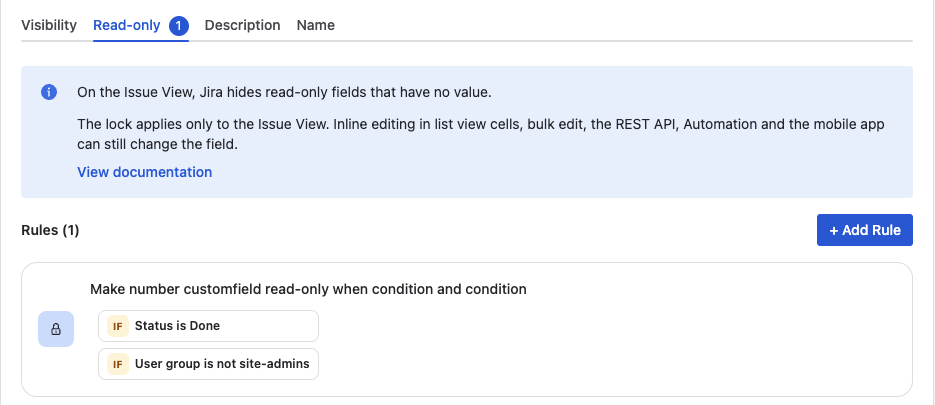
The same rule on our test space, where the status is Done and the exception is site-admins
Repeat for Effort in Hours
Rules belong to a field, so add the same rule, with the same two conditions, on Effort in Hours. Every other field on the work item stays exactly as editable as before.
Test with two accounts
Move a work item to Closed and open it as someone outside the group, then as a member. The first sees the value and can't change it; the second gets the usual inline editor.
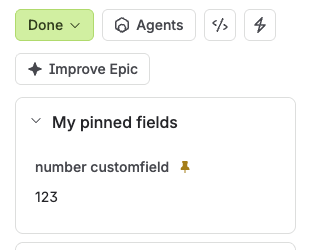
Outside the group: shown, not editable
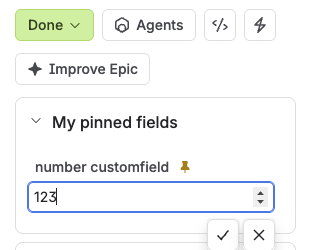
Inside the group: the usual editor
What the lock covers, and what it doesn't
The rule runs on the work item view in Jira Software spaces, company-managed and team-managed: the full page and the side panels opened from boards, backlogs, lists and search. It is a lock in the interface, not a permission. Inline edits in List view cells, bulk edit, Automation, the REST API and the Jira mobile app can still change the fields, and Jira hides a locked field while it is empty. If the values must be protected for audit, use the permission property on the status (route 2) and accept that it locks the whole work item.
Variations on the same rule
- No exception at all. Drop the group condition and the fields freeze for everyone once the work item is Closed.
- A project role instead of a group. Use a role condition when the people allowed to edit differ from space to space.
- Lock during review, not after it. Point the status condition at In Review: the fields lock while the work is checked and open again if it goes back to In Progress.
The field locking docs cover the rest, including locks inside transition dialogs. For the wider picture of fields that show, hide, become required or lock by context, see the dynamic forms guide.
Freeze two fields, not the whole work item
One Read-only rule per field: locked in Closed for everyone outside the group, editable for the group, and no change to the workflow. Free trial on the Atlassian Marketplace.
Start free trial on MarketplaceFAQ
Can you make a field read-only based on status in Jira Cloud?
Not for a single field natively. A permission property on a status (jira.permission.edit.*) locks the whole work item in that status, and removing a field from the Edit screen locks it in every status. Locking one field in one status takes an app with a status condition, such as Formify.
How do I restrict editing a Jira field to one group?
Jira Cloud has no field-level permissions, so natively you take the field off the Edit screen and let the group change it through a guarded transition or a manual Automation rule limited to that group. With Formify, a Read-only rule with the condition User group is not your group does it on the work item view.
How do I prevent editing closed issues in Jira?
Add the status property jira.issue.editable with the value false to Closed, and nobody can edit a work item in that status. To let one group or person keep editing, use jira.permission.edit.group or jira.permission.edit.user instead. Both apply to the whole work item, not to chosen fields.
What does the jira.permission.edit property do?
It narrows the Edit work items permission while a work item is in the status that carries the property. The value is a group ID, an account ID or a project role ID, depending on the key. It never grants access the permission scheme doesn't already give.
Does a Formify read-only rule stop Automation or the REST API?
No. The lock applies in the interface: the work item view and its side panels. Automation, the REST API, bulk edit, List view cells and the mobile app can still change the field. For protection outside the interface, use the permission property on the status.
Does this work in Jira Service Management?
Locks on the work item view run in Jira Software spaces only. In a service space, the permission property on the status is the native way to freeze a closed request.
Lock a field after Closed, keep one group editing
Formify makes chosen fields read-only on the work item view by status and group, with no new transition and no scripts. Free trial on the Atlassian Marketplace.
Start free trial on Marketplace