Require time to be logged (workflow validator)
This workflow validator blocks a transition if an issue doesn't have enough logged work time. It works on Jira's built-in Time Tracking (the same "Time spent" users see on the issue).
You can use it in both company-managed and team-managed projects.
This validator checks Jira's native Time Tracking (Time spent), not the app's custom Time Tracking fields. It enforces that work has been logged before a transition can complete.
What this validator does
When added to a transition (for example In Progress → Done), the validator:
- checks how much time has been logged on the issue using Jira's native Time Tracking,
- compares it to a minimum required duration that you configure (for example
30m,2h,1d 2h), - blocks the transition if the logged time is below that minimum,
- lets the transition pass if the logged time is equal to or above the minimum.
.png)
Validator flow: check logged time against minimum threshold
Adding the validator to a transition
Open the workflow editor
Open the workflow you want to modify and select the transition (for example In Review → Done).
Add the validator
Go to Validators → Add validator and choose Require time to be logged.
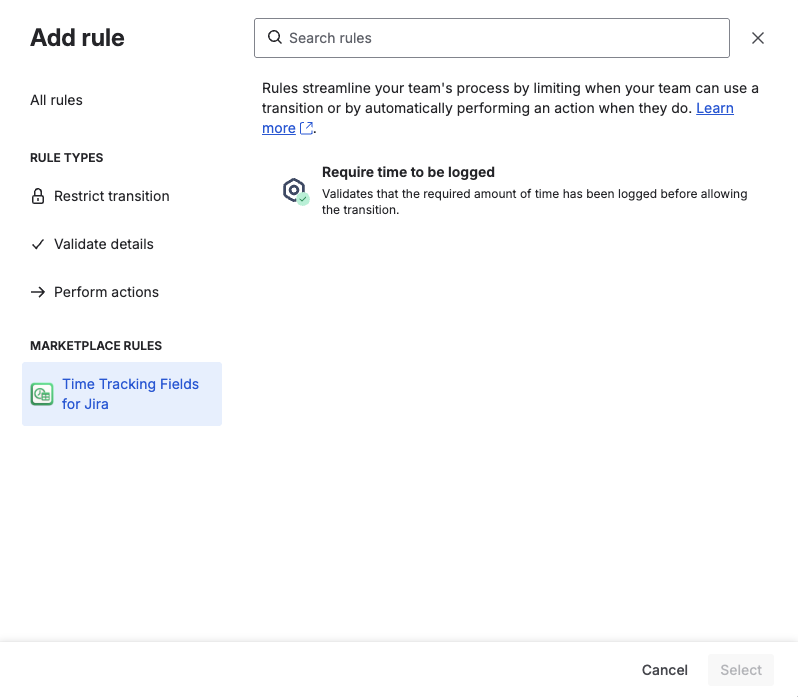
Selecting the validator in the workflow editor
Set the minimum required time
Enter the minimum amount of work that must be logged before the transition can complete. Use the standard Jira duration format:
30m— 30 minutes2h— 2 hours1h 30m— 1 hour and 30 minutes2w 3d 4h— combine any units
.png)
Configuring the minimum required time
You can add this validator to multiple transitions and in multiple projects. Each transition can have its own minimum required time.
What users see when the transition is blocked
If a user tries to execute the transition and there isn't enough logged time yet, the transition fails and shows a clear error message. For example, if you configured 31 minutes:
.png)
Transition blocked: not enough time logged
After the user logs enough time using Jira's native Log work / Time Tracking, the same transition will succeed.
Example use case
Goal: Make sure work is always logged before closing tasks.
Add the validator
On the workflow for your development project, open the transition In Progress → Done and add the Require time to be logged validator.
Set the threshold
Set the minimum logged time to 30m.
Result
Developers can move issues between earlier statuses as usual. When they try to move an issue to Done:
- if less than 30 minutes is logged, they see the error and must log time first,
- once at least 30 minutes is logged, the transition goes through.
This keeps your "Done" issues from having zero logged time and improves the quality of time-based reports.
Where you can use this validator
Because this is a standard workflow validator, you can:
- add it to any transition in a workflow,
- reuse it across different workflows and projects,
- set different thresholds for different transitions (for example 15 minutes for "Start progress", 2 hours for " Done").
The validator always checks the total logged time on the issue in Jira's native Time Tracking and enforces the rule consistently wherever you attach it.