Jira Bug Report Template: Best Practices for Engineering Teams
A weak issue intake format creates hidden cost in every sprint. A strong Jira bug report template gives each bug the minimum structure needed for fast triage, reliable reproduction, and cleaner delivery handoffs. This guide gives you a copy-paste template you can use today, plus three implementation paths — from manual paste to full automation — so you can pick the one that fits your team size.
Quick answer
- Use a structured Jira bug report template with five sections: Summary, Steps to Reproduce, Expected vs Actual, Environment, and Severity.
- For a single small team, paste the template manually into every bug description.
- For multiple projects, automate it with Jira Automation rules or a dedicated template app.
Why most Jira bug reports waste time
Here is a pattern most engineering leads will recognize: a bug lands in the sprint with the summary "Payment flow broken". No steps, no environment, no severity. The assigned engineer spends 20 minutes writing a comment asking for details, waits a day for a reply, then discovers the reporter meant a different payment flow entirely. The bug is now three days old and nobody has started investigating.
This happens because Jira's default Create screen does not enforce structure. Every field is optional, so reporters under pressure take the fastest path: a vague summary and nothing else. The fix is straightforward — give every bug a required structure at creation time so triage never has to ask for basics.
The bug report template (copy-paste ready)
Use this as your default Jira bug description template:
## Summary
One sentence that states what is broken and where.

## Steps to Reproduce
1.
2.
3.

## Expected Result
What should happen.

## Actual Result
What happened instead.

## Environment
- Browser:
- OS:
- App version/build:

## Severity
- [ ] Blocker - cannot proceed
- [ ] Critical - major function broken
- [ ] Major - function impaired
- [ ] Minor - cosmetic or edge case

## Attachments
Screenshots, recordings, logs, or links.
This structure works even without additional tooling. If you want faster consistency, you can automate this template through Jira automation or through Templify template definitions.
What a good vs bad bug report looks like
The template above is abstract on purpose — here is what it looks like filled in well versus filled in poorly.
Summary: Login doesn't work
Steps: Try to log in
Expected: It should work
Actual: It doesn't
Environment: (empty)
Severity: Critical
Triage cannot reproduce, asks 3 follow-up questions, bug sits idle for 2 days.
Summary: Login returns 403 after password reset
Steps: 1. Reset password via /forgot 2. Use new password on /login 3. Click Sign In
Expected: Redirect to dashboard
Actual: 403 Forbidden, user stays on login page
Environment: Chrome 124 / macOS 15.1 / production
Severity: Critical — blocks all users who reset passwords
Engineer reproduces in 2 minutes, identifies auth token cache issue same day.
The difference is not length — it is specificity. Each section in the template forces the reporter to be concrete instead of vague.
Recommended default field values for bug reports
Use these defaults to make intake predictable while keeping manual flexibility where needed.
| Field | Default value | Why this default helps |
|---|---|---|
| Priority | High | Forces triage to actively downgrade rather than passively accept "Medium". Bugs that stay High get attention; bugs that deserve less are reclassified with a reason. |
| Labels | bug, needs-triage | Supports queue views and ownership routing. |
| Components | Team/component specific | Routes issues to the correct technical owner. |
| Environment profile | prod, staging, uat | Forces reporters to provide environment context and avoids mixing production incidents with test-only defects. |
| Story Points | Empty | Prevents premature estimation during intake. |
If your teams use different severity vocabularies, document the mapping in one shared playbook and link it from the template.
If each environment requires different diagnostics, use environment-specific bug templates. For example, production templates can require incident link + customer impact, while staging templates can require branch/build ID and test dataset details.
How to apply this template in Jira
Key difference: when default values are applied
Native automation usually normalizes data after the issue already exists, while template-driven create flow applies defaults before the issue is created.
Option A: Native Jira automation (best for small scope)
Use trigger Issue created, add condition Issue Type = Bug, and set the Description field with the copy-paste template above. In this model, defaults are enforced after creation, so reporters first submit the issue and may still need a follow-up edit to reach the final target values.
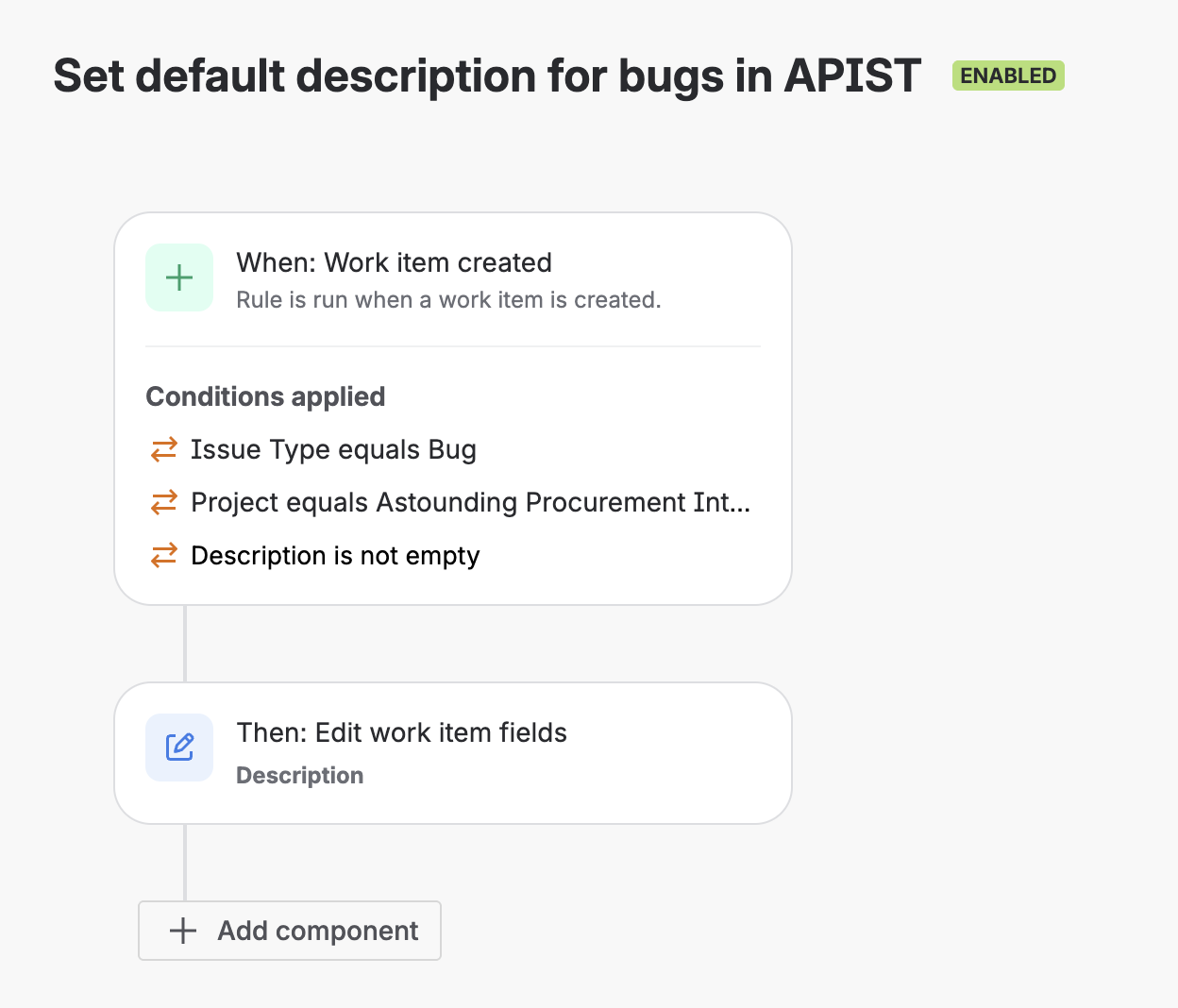
Native Jira Automation: Issue created + Issue Type = Bug + set Description template.
Option B: Templify workflow (best for multi-project scale)
Expose the Issue Template field on the Create form and let the reporter pick the bug template before submission. Templify pre-fills key fields immediately in the form, so the new issue is created with the intended target values from the start, without a second edit pass.
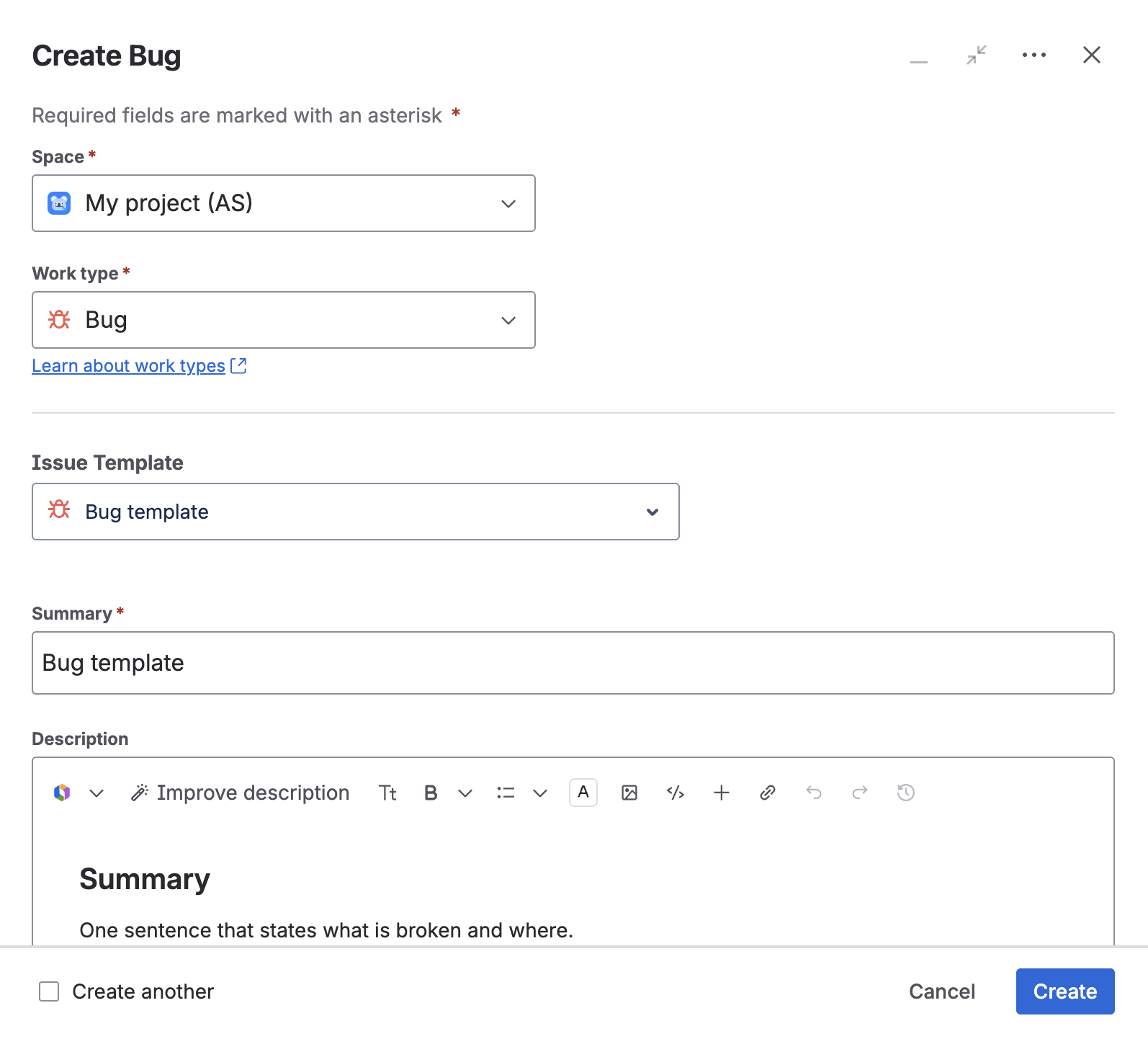
Templify in Create flow: selected bug template pre-fills the issue form.
For a full setup walkthrough, see the Templify Marketplace listing and the docs links in the final section.
Which implementation path fits your team?
Answer each question in order. Your first Yes determines the path.
Paste the template into a pinned Confluence page or team wiki. Zero setup, zero maintenance.
Jira Automation fills description after creation. Good for single-project, low-variant setups.
Pre-fills fields at creation time. Best for multi-project scale and governance.
Common mistakes and how to avoid them
Impact in Jira: reporters fill fields with placeholders like "N/A" just to submit, so data looks complete but is not actionable.
Fix: require only intake essentials (steps, expected vs actual, environment, severity). Move deeper fields (root cause, rollout notes) to triage or transition.
Impact in Jira: one team marks "Critical" for cosmetic issues while another reserves it for production outages, so priority queues become noisy.
Fix: add one-line severity criteria directly in the template and align triage rules around those definitions.
Impact in Jira: issues bounce between QA and engineering with "cannot reproduce" comments, adding delay before any real fix starts.
Fix: enforce numbered steps and include environment details in the same block to keep reproduction deterministic.
Impact in Jira: new bugs sit unassigned in the backlog because no component or routing label points to the responsible team.
Fix: prefill routing labels/components in the template and optionally add an automation rule for first-pass assignment.
Rollout sequence
Rolling out a bug template follows the same pattern regardless of tooling: prove the format in one project first, then scale.
- Pilot in one project. Pick a high-volume project, paste the template into every new Bug for one sprint, and measure whether triage follow-up questions drop.
- Lock in the format. Once the team agrees the structure works, automate it — either with a Jira Automation rule (Option A above) or a reusable Templify template (Option B).
- Expand across projects. Roll the same template to other projects. If teams need variants (e.g., production incidents vs staging defects), create environment-specific versions rather than one overloaded template.
- Review quarterly. Check whether sections are consistently filled or routinely skipped. Drop fields nobody uses; add fields triage keeps asking for.
Templify shortcut
If you use Templify, the Quick Guide covers install, template creation, and default-template-per-issue-type setup in under 10 minutes. Free for teams up to 10 users.
FAQ
How do I handle bugs that span multiple components?
Create one bug for the primary symptom and link related issues. If your template includes a Components field, default it to the team that owns the entry point (e.g., frontend for a UI bug that triggers a backend error). Let triage split the work across components — don't ask the reporter to decide the architecture.
Should QA or developers write the bug report?
Whoever discovers the bug should fill the template. QA typically writes more reproducible reports because they include exact steps, but the template exists to close that gap. If developers file bugs from code review or monitoring, the same structure applies — skip the browser/OS fields and fill in the service name, log link, and stack trace instead.
How often should we update the bug report template?
Review once per quarter. Look at which fields are consistently skipped (candidates for removal) and what questions triage keeps asking (candidates for new fields). A template that stays untouched for a year is either perfect or ignored — check your data to know which.
Related guides in this series
- Default Description Template in Jira Cloud Without Scripts
- How to Create Issue Templates in Jira Cloud
- Jira User Story Template (Copy-Paste Ready) — same structure adapted for features, API work, and internal tooling
- Jira Automation Issue Templates: Epic-Task Workflows
- Templify vs Jira Template Apps: Feature Comparison
Standardize bug intake across projects
Use one bug template format in Jira Cloud, then scale it with reusable template operations and controlled rollout.
Start trial on Marketplace